Connect a Repository
For whoever has to point a board at the code. Services on your board map to Git repositories, where agents actually do their work; Cat Factory connects to GitHub through a GitHub App, which it uses to link, bootstrap, and reconcile repositories.
GitHub App integration
Repository, pull request, and issue operations all flow through a GitHub App:
- Repository read/write for cloning and pushing branches.
- Pull request creation and status.
- Issue read for importing requirements.
- Webhooks for push, PR, and issue events, which Cat Factory projects into its local database to keep the board in sync.
Repositories are tracked per workspace, with credentials isolated to that workspace.
Your personal GitHub token
You can optionally connect your own GitHub personal access token under Integrations → Source control → My GitHub token (a classic ghp_… token with repo and workflow scopes). Cat Factory validates it against GitHub and shows who it authenticated as. The token is stored per-user and write-only (never shown again). It does two things:
- Attributes your runs to you. Runs you initiate prefer your token over the deployment's GitHub App for pushing the work branch and reading the CI and merge state, so the resulting commits and PR are attributed to you. Leave it unset and runs fall back to the workspace's GitHub App.
- Widens the repo picker. On every deployment (local mode included), Add from existing repo also lists repositories your token can reach beyond what the workspace's GitHub App is installed on, tagged · personal (your token). Linking one creates a personal service: runs against it use your token for push, PR author, and CI actor. It is public github.com only (a GitHub Enterprise host isn't offered for a personal token).
A service backed by another member's personal token is hidden from members who can't reach that repo: its frame shows a Permission denied placeholder and its tasks are dropped from their board view, failing closed rather than leaking a repo they lack access to. If your token expires or is revoked, the picker quietly falls back to App-reachable repos.
Linking an existing repository
Link any repository the GitHub App can access to a service frame. From then on, runs on tasks under that service clone and open PRs against it.
The quickest path is Add from existing repo (sidebar → Repositories). It opens a picker of every repo the GitHub App can reach (including ones the workspace doesn't track yet) with a search/filter box (by owner or name, with a "showing X of Y" count) so a wide install of hundreds of repos stays manageable, plus a link to grant the App access to more. Importing links and syncs the repo, drops a ready service frame named after it, and points the frame at the repo, so tasks you add under it target that repo, with no bootstrap run. Right after adding, the modal shows the same configuration controls as the service inspector (test infra, the docker-compose path, cloud provider and instance size, and best-practice fragments), so you can finish setting the service up without a second trip to the inspector.
Bootstrapping a new repository
Cat Factory populates a repository with a reference architecture; it does not, by default, create the repository itself.
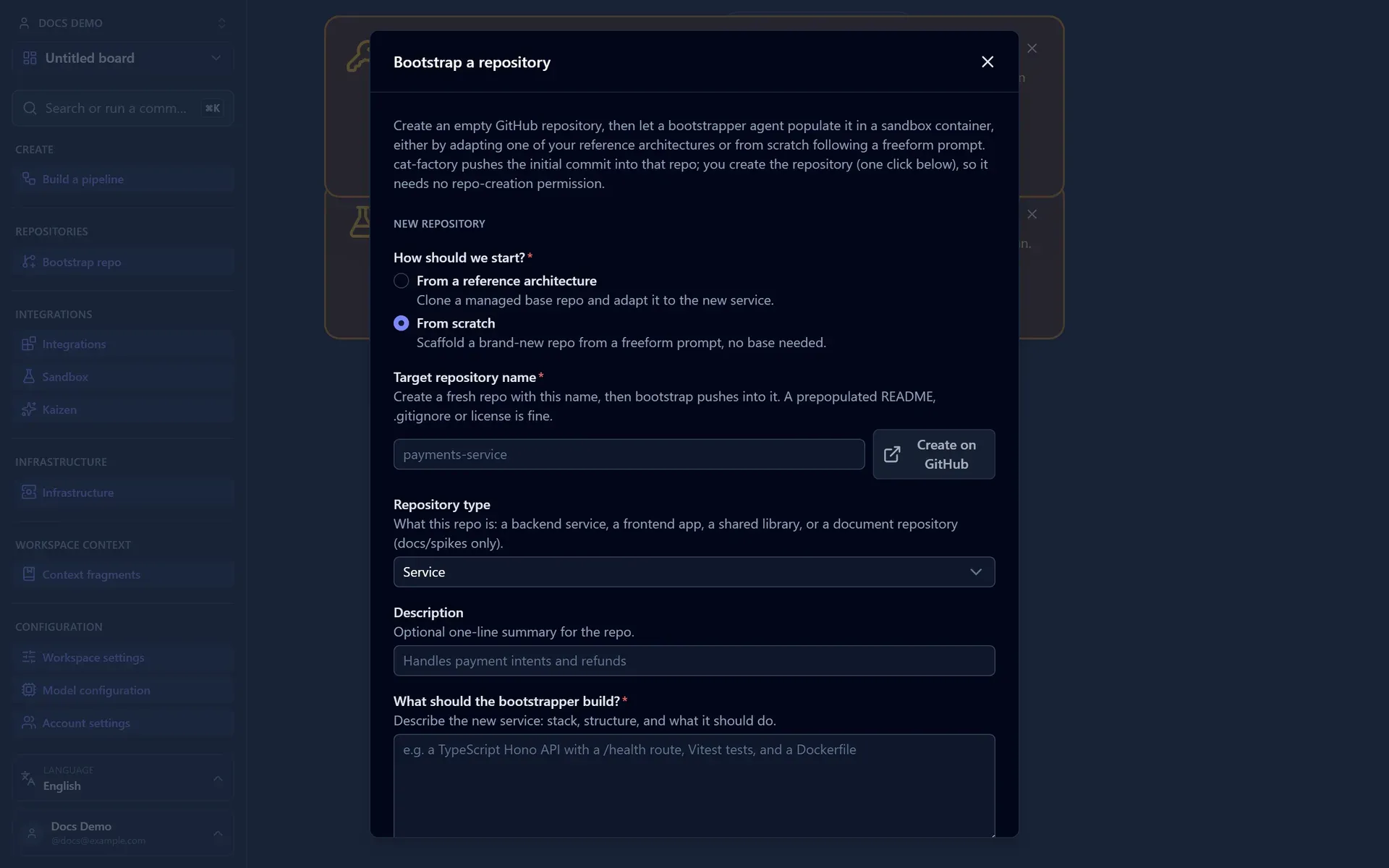
The standard flow:
- Select a reference architecture or scaffold template.
- Create the target repository, empty, on GitHub. The bootstrap dialog links to GitHub's new-repo page prefilled for you. Make sure the GitHub App can reach it: install the App on the new repo, or install it on all repositories for the account or org.
- The bootstrap agent force-pushes the template into the empty repository.
- A service frame appears on the board automatically.
The default GitHub App holds no Administration permission, so it cannot create repositories. Creating the empty repo yourself is the one manual step. An organization can remove it by opting into the privileged App tier, which creates the repo programmatically; see Register the GitHub App → Programmatic repository creation.
Every new service starts from a consistent, known-good baseline.
The reference architecture's own repository has to be reachable too
The App needs access to two repositories, not one: the target it pushes into, and the repository the reference architecture names, which the run clones to copy from. A reference architecture is just an owner/name somebody typed, so a private template the App was never granted, or a typo in the entry, leaves the run with nothing to clone.
Cat Factory checks this before it starts. If the workspace's source-control connection cannot see the reference architecture's repository, the launch is refused on the spot and nothing is created: no run, no service frame on the board, nothing to clean up. The dialog names the repository it could not see and offers to open that reference architecture for editing, and the rest of the form is kept, so correcting the entry and launching again is two clicks.
Two things fix it, and which one you want depends on why it failed:
- The entry names the wrong repository: correct Owner and Repository on the reference architecture.
- The repository is right but the App has never been granted it: add it to the App's repository access, the same step the target repository needs.
Where the check cannot reach GitHub at all, the launch is refused too, but as an outage rather than as a mistake in your configuration: nothing to change, try again once the connection recovers.
Repository types
When you add a service from a repo or bootstrap a new one, you pick a repository type that shapes which pipelines and infrastructure apply to it:
| Type | For | Behaviour |
|---|---|---|
| Service | A backend service (the default). | Full pipelines, ephemeral environments, and the Tester's infra. |
| Frontend | A UI app. | Backend links and a UI-test flow. See Preview and Test a Frontend. |
| Library | A published package. | Build, test, and merge, with no deploy step, no ephemeral environment, and no Tester infra. |
| Document | A docs repo. | Only spike and document tasks, and the document pipelines. Non-doc tasks are refused, and a task dragged into a doc frame is re-typed. |
The type is stamped on the service frame when it is created. A frontend frame carries a build, serve, and test config, plus backend bindings: you map a frontend env var (e.g. VITE_BACKEND_URL) to a backend service's live preview URL or a WireMock stub. A binding to another service draws a board link (a cyan edge) between the two frames, so the board shows which backend a frontend is wired to. Configuring a frontend frame, the browser-based UI test, and the local browsable preview are covered in Preview and Test a Frontend.
Service blueprints & reconciliation
For existing repositories, the blueprint agent keeps board and code aligned:
- It decomposes the repository into a
service → modules → featuresmap. - The map is stored in-repo under
blueprints/. - It compares that map against the current board state.
- It suggests structural updates and additions so the board reflects reality.
The decomposition is domain-driven: each module is a business domain (a bounded context, aggregate, or subdomain) named after a business concept. Shapes like api, routes, controllers, utils, config, types, and db are explicitly not domains; the genuinely cross-cutting plumbing collapses into a single infrastructure module rather than scattering across many technical ones. So the board reflects what the service does.
This is how an established codebase gets represented on the board without hand-modeling every piece.
Blueprints are the descriptive in-repo artifact ("what the code is"). Their prescriptive counterpart, "what must be true", is the spec the Spec Writer keeps under spec/ in the same repo.
Monorepos
One repository can back several services. Flag the repository as a monorepo, then pin each service to a subdirectory of it. When you add services from a monorepo, browse the repo's tree and select the directories of the services you want (from any folder), then add them all in one step: the modal shows a Selected services list and an Add N services button. Each service is pinned to its subdirectory.
Agents that edit code run scoped to that subdirectory: the coder, mocker, and CI fixer work with the service's directory as their working directory, so they stay inside their part of the repo. Repo-wide agents (blueprints, requirements, merger, and conflict resolver) run at the repository root by design, since their job spans the whole repo.
Repositories that are not flagged as monorepos are unchanged: the service owns the whole repo.
One of them can be the frontend
A monorepo that holds a UI app beside its backends can say so in the same pass. Select the directories as usual, then name the app's directory under Frontend app. It is added as a frontend frame pinned to that subdirectory instead of a backend service, and bound to every service added beside it, so the board draws the frontend-to-backend links as soon as the import finishes.
The option appears once at least two directories are selected and the repository type is Service, because a backend binding can only point at a backend service. Leave it on None and every selected directory is imported as a service, exactly as before.
Those bindings arrive without environment-variable names: nothing has read the app's source, and a guessed name would look configured while injecting a variable the app never reads. Open the frontend frame's inspector to name each one, or use Detect from repo to propose them from the repo's .env examples. Until a binding is named it is a board link and nothing more. See Preview and Test a Frontend.
Keeping in sync via webhooks
Because the GitHub App sends webhooks, changes made directly in GitHub (pushes, PR merges, issue edits) are projected back into Cat Factory's database, so the board stays current even when work happens outside the platform.
GitLab
Cat Factory runs on GitLab as well as GitHub, through a provider-neutral VCS layer. The GitLab backend (@cat-factory/gitlab) implements the neutral VCS client over the GitLab REST v4 API (repository, branch, merge-request, issue, and CI reads and writes), a webhook verifier and mapper (merge request, issue, push, and pipeline hooks), and project provisioning.
GitLab is first-class on every runtime, hosted Cloudflare and Node included, not just local mode. A GitLab repo clones, pushes, gates on real CI, and merges through a real merge request, and the engine syncs from GitLab webhooks. The VCS flow reaches feature parity with GitHub, including squash merge, rebase, mergeability, and human review (merge-request approvals and resolvable discussion threads). Users can sign in with a GitLab PAT on hosted deployments, and GitLab group membership counts toward the AUTH_ALLOWED_ORGS allowlist.
Enable it with a single token per deployment: GITLAB_TOKEN on Cloudflare and Node (see Configuration → GitLab), or GITLAB_PAT in local mode. The provider is picked per repo from the clone-URL host, so a deployment can drive both GitHub and GitLab.
Connecting a workspace to GitLab
Beyond the deployment token, a workspace connects its own GitLab account with a personal access token. Open Source control (or the connect gate you see on a workspace with nothing connected yet), paste a token with the api scope, and connect. The token is validated against your GitLab identity before it is stored, and a rejected token reports GitLab's own error inline. Stored tokens are sealed with the deployment's ENCRYPTION_KEY, so the flow needs a deployment with GITLAB_TOKEN and an encryption key set.
Once connected, the workspace browses, links, and syncs GitLab projects through exactly the same screens a GitHub-App workspace uses. Which connect surfaces the panel offers comes from what the deployment actually wired: a GitHub App installation picker, a GitLab token field, both, or a notice that no source-control connection is configured. So a GitLab-only deployment never shows an App picker it cannot serve, and one deployment can serve GitHub-App and GitLab-PAT workspaces side by side. Disconnecting routes through the connected provider, so a GitLab connection is never torn down by the GitHub path.
Accepted GitLab gaps
GitLab is a source-control backend only, not an issue source, and code search and issue sub-hierarchies are unavailable (GitLab's basic API doesn't provide them).
Next: pull requirements straight from your trackers with Connect Issue & Document Sources.