Design Your Board
For whoever lays out the work before any agent runs. The board is where you describe what you're building, and it is also the work queue. Blocks can start here, or come from an issue imported from a connected tracker (see Connect Issue & Document Sources); either way the tracker stays the source of truth for the issue and the board is where the work runs. This page covers building and organizing that structure.
The canvas
The board is a pannable, zoomable canvas rendered with Vue Flow. As you zoom, the canvas uses semantic level-of-detail rendering: high-level frames stay legible when zoomed out, and detail appears as you zoom in. Keep zooming into an in-flight task and its card grows downward, first into its full build-pipeline steps, then one notch further into each step's live subtask breakdown, so you can watch a run's internals spatially as you zoom. (Cards expand only when they're on screen, and where two would overlap only the centre-most opens, so deep zoom stays readable.)
Both service frames and the module frames inside them are resizable, Miro-style: drag a frame's right or bottom edge (or its bottom-right corner) to set its size, or leave it to auto-size from its contents. A frame never shrinks below the blocks it holds, and the size is remembered.
Service frames are also freely draggable: grab anywhere on a service's header bar (the action buttons stay clickable) and the frame tracks the cursor. Moving one service never pushes others aside, so frames can overlap as much as you like. When two overlap, hover the one you want and it lifts to the front; the frame you're dragging always sits on top.
Navigating: navbar and command bar
The left rail is a navbar grouped into Create, Repositories, Integrations, Workspace context (the prompt-fragment library), and Configuration. You don't drag blocks or pipelines from a palette. Instead, a command bar (open with ⌘K / Ctrl-K) is the launcher for creating blocks and building pipelines.
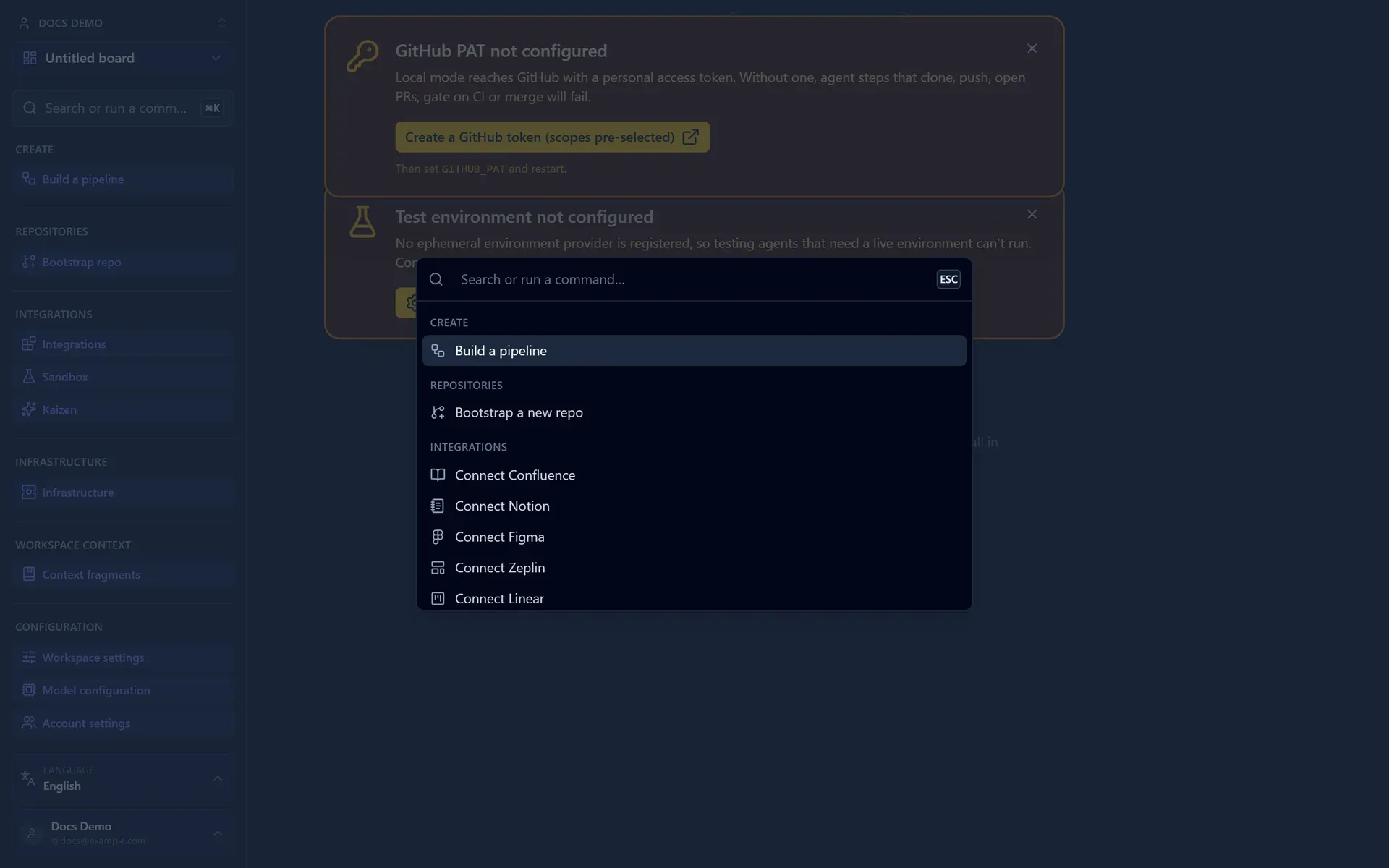
The board toolbar adds an Add service menu to mount a shared service from your org, and a service frame offers Add task and Add recurring pipeline.
Configuration holds workspace-wide settings panels:
- Model Configuration: manage the model presets tasks run on.
- Risk policies: manage the named risk policies a task chooses. After CI passes, the Merger step scores the PR on complexity, risk, and impact and auto-merges only within the policy's ceilings; the same policy also carries the CI-fixer, requirement/tester iteration, fork-decision, and release-health knobs, plus whether a run under it waits for a person at its own automatic checkpoints. Promote one row as the default for runs started in the app and one as the default for runs nobody is watching.
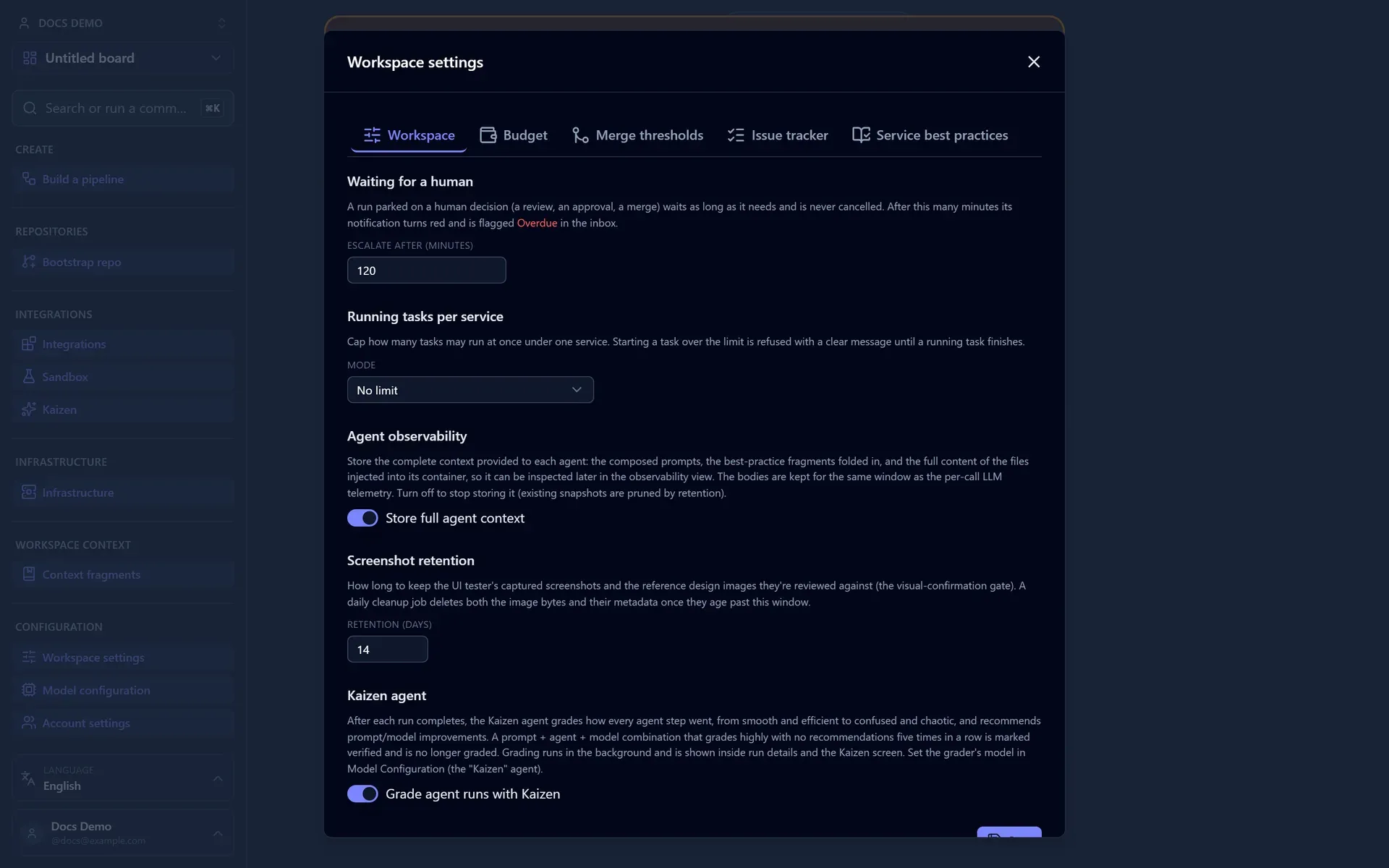
- Workspace settings: the running-task limit, the waiting-decision escalation threshold, and review-debt friction (see Workspace settings).
The three levels
Build top-down using the block hierarchy:
- Frames (services): one per deployable service, usually linked to a repository.
- Subframes (modules): major areas inside a service.
- Leaves (tasks): concrete, agent-sized units of work.
Sizing tasks
A task should be something an agent can implement and land in a single pull request. If a leaf feels like it spans several PRs, split it into sibling leaves.
Adding and editing blocks
- Create a block from the command bar (
⌘K) or the per-frame Add task / Add module controls, at the level you need. When you add a task, pick its type (Feature, Bug, Document, Spike, Review, Ralph loop, or Media), which adjusts the form (a Bug collects severity and steps to reproduce, a Spike a time-box, a Document its kind and target path, a Review the PR to audit and a review focus, a Ralph loop its validation command and iteration budget) and lets the workspace cap concurrency per type. A Media task's deliverable is generated files (images, 3D models, audio) rather than code, so it opens no pull request. A deployment can add task types of its own, an "incident" or a "compliance-audit", which then appear in the picker and as a badge on the card like any built-in. - Edit its title, description, status, chosen pipeline, prompt fragments, risk policy, and (on a task) its responsible product person in the inspector.
- Reparent by dragging a block onto a new parent, which is useful as your design evolves. Moving a task into another service's frame re-homes it onto that service.
- Delete a block to remove it. Deletion is optimistic (the block disappears at once and only reappears, with an error toast, if the backend rejects it) and idempotent, so deleting a block whose row is already half-gone cleans up the leftovers instead of erroring. Deletion cascades to children, so deleting a service removes its modules and tasks too, and a service or module delete confirmation names how many items it will remove. A delete shows a Deleted X toast with an Undo button that restores the whole subtree (edges included), and a drag-reparent shows a Moved X toast with the same Undo, so a slip is recoverable.
Epics and dependency edges
Beyond the parent/child hierarchy, two relationships connect tasks across the board.
Dependency edges capture ordering. Drag from the handle on a task card to another task to draw a "depends on" edge, and Cat Factory enforces it:
- A task won't start while any task it depends on is still unfinished; the start button reports what it's waiting on instead of launching.
- An edge that would close a cycle is rejected, so the graph stays runnable.
- Turn on Auto-start dependents (task inspector) and, when this task merges, the engine starts the tasks that depend on it automatically. Dependents pinned to an individual-usage model are skipped, since those need someone present to unlock the credential.
Epics group related tasks that span services or modules. Membership is a tag rather than a container, so an epic can pull in tasks from several frames, and deleting the epic clears the grouping without deleting the tasks. Importing a Jira epic or a GitHub parent issue can create the epic and all its child tasks at once, seeding dependency edges from the issues' "blocked by" links (see Connect Issue & Document Sources).
Service connections
A service frame can declare the other services it uses, for example a service that sends its email through another. Open a service frame's Service connections panel and add a connection to another service, with a short description of how it uses it ("sends emails via it"). Each connection draws an emerald dashed edge on the board from the user to the service it depends on, and the reverse side shows a Used by list. A service can't connect to itself, and duplicate targets are rejected.
On a task, the Involved services selector (task inspector) marks which connected services are directly involved in that task, beyond the task's own service. The task's own service is always implied. The selector offers the connection neighbours of the task's frame; a service no longer connected is dropped on the next change rather than failing the run.
Marking a service involved changes how the task runs:
- Context. The connection description and the involved service's live environment URL are folded into the coding agent's prompt, so the agent understands the relationship.
- Environments. Each involved service is provisioned as its own ephemeral environment alongside the task's own service, providers first, so a dependent service's provisioning can template in a ready peer's URL. The tester reaches all of them.
- Repositories. The coding agent (and CI fixer) works across the repositories of the task's own service and each involved service in one checkout, with sibling working directories. It commits on the same work branch in every repo and opens one PR per repository that actually changed; untouched repos get no PR. Two services in the same repo share one checkout and one PR.
- Conflicts. A merge conflict on any involved repo's PR (not just the task's own) is auto-resolved by the conflict resolver, pointed at that repo. When it still can't after its attempt budget, the block error names which repo's PR needs a manual resolve.
- Merge. CI aggregates across all the PRs, the merger scores the combined cross-repo change as one assessment rather than only the primary repo's diff, and it merges the PRs provider-before-consumer. Cross-repo merge is not atomic: if a merge fails partway, the task is left blocked with a notification listing which PRs merged and which didn't, for you to finish by hand.
You only set the connection (and its description) on the frame and the involved-services checkboxes on the task; the sibling layout, per-repo PRs, and merge order are automatic.
Linking a repository
A service frame typically maps to one Git repository. You have three options:
- Link an existing repository the GitHub App can access.
- Bootstrap a new repository from a reference architecture: you create the empty repo on GitHub (or an org can let the privileged App tier create it), Cat Factory force-pushes the template into it, then the service frame materializes on the board.
- Reconcile an existing repo's structure onto the board with service blueprints.
All of this is covered in Connect a Repository.
Assigning models
Models are assigned through presets under Configuration → Model Configuration. A preset sets a base model for every agent kind plus optional per-kind overrides, so you can point the Architect at a stronger model while everything else stays on the base. One preset is the workspace default (every workspace seeds Kimi K2.7, GLM-5.2, and Claude Opus 5 to start), and a task picks the preset it runs on in its inspector. Use stronger models on architecturally significant kinds and cheaper ones on routine steps to manage spend. See Choosing models.
Workspace settings
Configuration → Workspace settings holds the team-wide controls:
- Running tasks per service: cap how many tasks may run concurrently under one service frame. Choose No limit, a single shared cap across all task types, or a per-type cap (a separate number per task type). Starting a task that would exceed the cap is refused until a running task finishes, so a busy service doesn't fan out more agents than you want.
- Waiting for a human: how many minutes a run may sit parked on a decision before its inbox notification escalates to red and is flagged Overdue (default 120). Parked runs are never cancelled; the escalation just makes a neglected decision more visible.
- Review-debt friction: discourage authoring new tasks while finished work sits waiting on a human. See below.
Review-debt friction
Agents finish work faster than people review it, and a board can quietly accumulate a queue of completed tasks nobody has looked at. The Review-debt friction group in workspace settings adds back-pressure at the point where the debt grows: task creation. It is off by default and has three modes:
- Off: no effect.
- Warn (confirm to proceed): past Warn at (tasks in review) (default 3), creating a task opens a dialog listing the waiting tasks, each deep-linkable, with Create anyway and Go review.
- Enforce (hard block): warns as above, and past a hard trigger refuses the create outright. The dialog then offers only Go review. Enforce needs at least one hard trigger enabled: Block at (tasks in review), Block after (minutes waiting), or both.
The add-task affordance itself carries a badge counting the tasks currently waiting on review, so the number is visible before you start authoring rather than only when you are stopped.
A suggested workflow
- Lay out frames for each service.
- Fill in modules for the major areas.
- Break modules into tasks sized for a single PR.
- Connect dependency edges where order matters.
- Link or bootstrap repositories on each service.
- Move to Clarify Requirements to make each task agent-ready.
Next: make your tasks unambiguous with Clarify Requirements.