Apply Standards with Prompt Fragments
For a team that keeps telling agents the same thing. Prompt fragments are reusable, version-controlled guidelines that agents pull into their prompts at run time: encode your standards once - coding conventions, review checklists, security rules - and apply them everywhere.
For a procedural playbook that runs as its own pipeline step rather than passive guidance folded into every agent, see Run a Claude Skill.
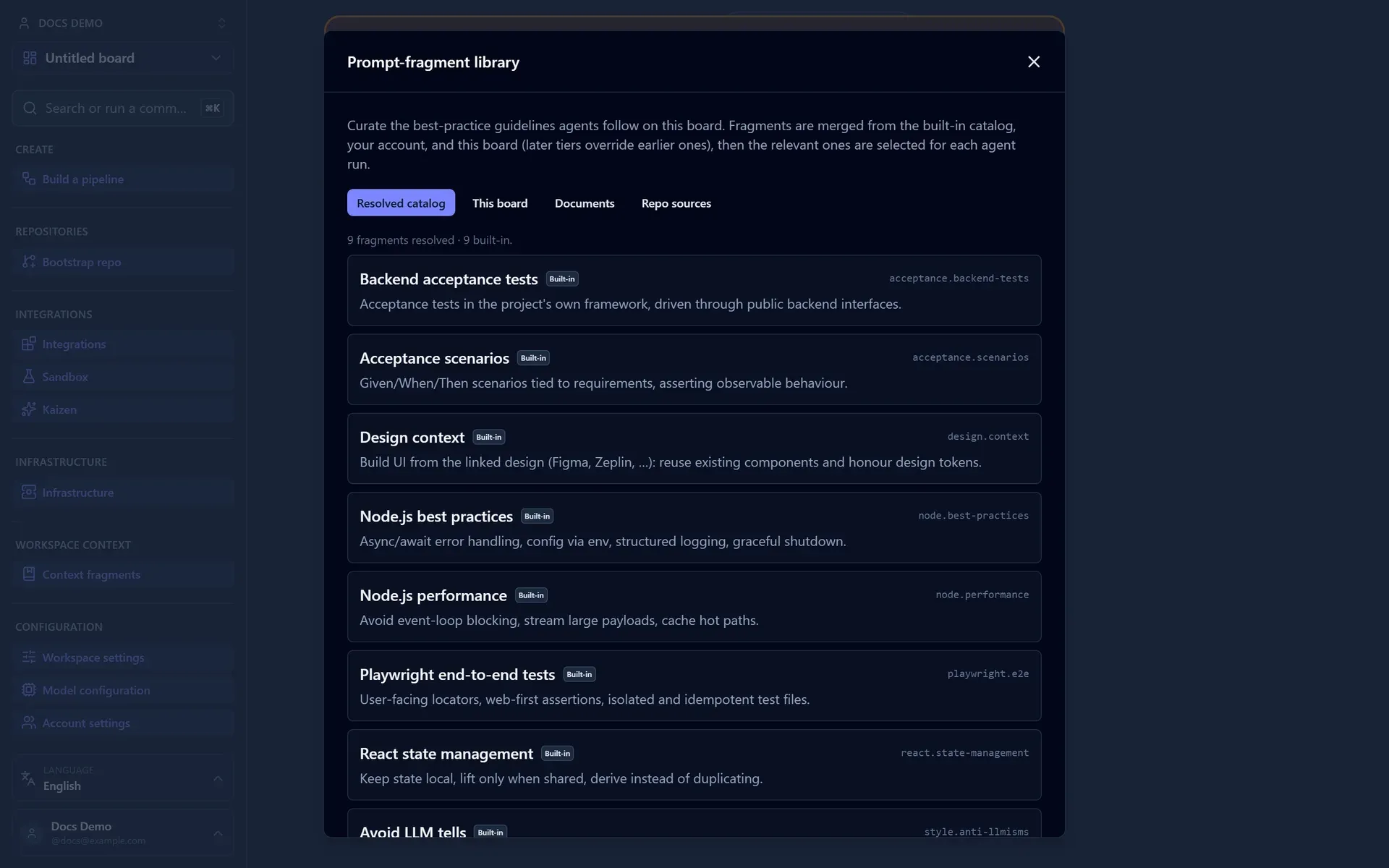
The three scopes
Fragments are organized in a tenant-scoped library with three tiers. Lower tiers layer on top of higher ones:
| Scope | Applies to | Use it for |
|---|---|---|
| Built-in | Everyone | Best practices shipped with the platform. |
| Account | All workspaces in your account | Organization-wide standards. |
| Workspace | A single board | Per-project customization. |
You can also source fragments from a repository so they live under version control alongside your code. The library is on by default on every runtime, with no secrets to set: fragments aren't secrets and their tables ship in the base migrations, so a stock deployment can curate and link fragments out of the box. Turn it off with PROMPT_LIBRARY_ENABLED=false. When it is off, the fragment screens show a plain "not enabled for this deployment" notice instead of forms that error.
Manage workspace fragments from a board's fragment library, and account fragments (authored, document-backed, and repo-sourced alike) from Account settings, which works for both personal and organization accounts. The two libraries cross-link, so you can jump between an account standard and the board that layers on top of it.
You author a fragment by pasting its content and giving it a title. Titles matter (agents cite standards by them), so the editor has a Generate button beside the title field that suggests one from the content with an inline model call. Existing fragments edit in place in the same list.
How agents use them
Fragments are assigned on a service and pinned per task. On a service inspector's Service best practices you pick the standards for the whole service, and every run on it applies them. A new task is seeded from its service's list, but from then the task owns its selection: pin an extra fragment or drop an inherited one just for that task, and its agents follow exactly the task's own list. Removing a fragment on a task really drops it for that task, and later changes to the service's list don't rewrite tasks that already exist. Only a service-level run folds in the service's own standards.
The picker is the same everywhere: the add-task form, the task inspector (Best practices under Structure), and the service inspector. Click the + to open it, click fragment rows to toggle them (the panel stays open so you can add or remove several at once), then click Done. Selected fragments show below as chips you can remove. The picker also links straight to the board's fragment library and to account fragments, so you can author or edit one without leaving the step.
Picking standards over the API
An integration filing work through the public API picks the same way. GET /api/v1/prompt-fragments lists what the board resolves, merged across all three tiers, with each entry's title, category, one-line summary, tags and the tier it came from; the guidance text itself is not served, because naming a standard needs its id rather than its content. Send the ids you want as fragmentIds on the task create, and read them back on the task. An id the board does not hold is refused rather than quietly dropped, so a typo fails on the create instead of producing a run that followed nothing.
Leave fragmentIds off and the task inherits its service's standards, which is the same default the add-task form opens with. Send an empty list to pin nothing at all.
Fragments fold into code-aware agent kinds (such as the coder, CI fixer, fixer, reviewer, and architect) and into the document-authoring kinds (see Author a Document). A code-style or review-checklist fragment reaches the coding steps automatically; a writing-style fragment reaches the document steps. Steps that touch neither code nor prose are left untouched.
Each fragment reaches the agent as its own delimited, title-labelled block rather than one merged wall of text, so an agent can cite a standard by name. Give your fragments titles that read well as citations ("No raw SQL in controllers" beats "Rules 3").
Adherence reports
Because the standards arrive labelled, the code reviewer and the PR reviewer score the change against each one. Their result windows carry a Best-practice adherence section: per standard, a score out of ten and the findings related to it, or an explicit "none reachable" when a standard could not be judged from the diff. It tells you which of your standards the change actually honoured, instead of a single overall verdict.
Per-task-type defaults
A new task of a given type can start with a default set of fragments already pinned. The only built-in default is for document tasks: two writing-style fragments (Avoid LLM tells and Concise and actionable) are pinned on every new document task. A deployment can register its own custom fragments as the default for any task type (feature, bug, review, and so on) at startup with registerPromptFragments(...) and registerTaskTypeDefaultFragments(taskType, ids); registered ids augment the built-in document defaults rather than replacing them. This seeding is server-side, so a task created through the API carries its type's defaults whether or not the caller named any standards of its own. It is a deployment-level seam, not a UI setting.
Link an external document as a living fragment
A fragment can be backed by an external document instead of text you paste. Link a Confluence page, a Notion page, or a GitHub file (any connected Document source), and its guidance is re-read from the source whenever an agent run uses it. Edit the upstream doc and the next run follows the new version.
To set one up, open the fragment library and pick the Documents tab. Choose a connected source, enter the Page id or URL (a Confluence or Notion page), add optional tags, and click Link as living fragment. For a GitHub source you don't type an owner/repo/path: pick the repo from a search box and browse its tree to the file. The fragment then shows a Live badge with its source and a "last resolved" timestamp. Document-backed fragments are available at the account and workspace tiers.
Sync a whole directory of guidelines from a repo
To pull a folder of Markdown guidelines rather than a single file, open the Repo sources tab. Search for the repo, browse to the directory of Markdown guidelines (or pick the repository root to link the whole repo), and click Link & sync. Each Markdown file becomes a fragment, kept in sync with the source.
A repo source tracks the directory's head commit. When new commits touch that directory, the source shows a Changes available badge (otherwise Up to date); resync to pull the new versions. The check reads only the current head commit of the source, so it is cheap, and fragment bodies are cached locally, so a run never re-fetches from GitHub.
Unlinking a source is a confirmed action: it asks you to confirm, naming the repo and warning that the guideline fragments it synced will be removed (you can re-link it later), so a synced source isn't dropped by a stray click.
The body is cached as a last-resolved snapshot and refreshed on a short TTL (5 minutes by default). If the source is unreachable at run time, the run falls back to the cached body, so resolution never blocks a run. To pull the latest immediately rather than waiting out the TTL, use the fragment's refresh action.
For an account-tier document fragment, the source is read through one workspace's stored connection (document credentials are per workspace), so you pick that workspace when you link it. Workspace-tier fragments use their own workspace's connection.
Versioning
Fragments are version-controlled. This gives you:
- A stable history of how guidance has changed.
- The ability to pin a service to a known fragment version.
- A clean way to evolve standards without disrupting in-flight work.
How linked context reaches a container agent
Fragments carry your standing standards. A task's own linked material (the documents and tracker issues attached to a block, plus any imported reference its description or incorporated requirements names) reaches the agent a different way.
For a container agent (one that works in a checkout), the engine writes the full text of each linked document and issue into a .cat-context/ directory in the checkout and lists them as a short summary index in the prompt. The agent opens a file on demand instead of working from a short excerpt. These files are kept out of commits through a local git exclude, so they never land in a PR. For an inline agent (no checkout), the budgeted body is injected into the prompt directly.
The engine also resolves references a block names explicitly: a Jira key (PROJ-42), a fully-qualified GitHub reference (owner/repo#N), or a URL is matched against the already-imported corpus and delivered the same way. A bare #N is not resolved, since it is ambiguous across a multi-repo workspace. Reference resolution is a point lookup against material already imported, so nothing is fetched from external systems at run time.
What an agent author should know: relevant requirements, RFCs, PRDs, and tracker issues are on disk under .cat-context/, named in the prompt's summary index and in AGENTS.md. Read those files when they are relevant. Do not try to reach Jira, Confluence, or GitHub from the harness: everything available is already on disk.
Putting it together
Built-in defaults
   └─ + Account standards
        └─ + Workspace tweaks
             └─ assigned per service  →  code-aware agent steps
Start small
Begin with one or two account-level fragments (a coding-style guide and a review checklist), then add workspace fragments only where a specific board needs to differ.
Next: run a playbook as its own step with Run a Claude Skill, or try a fragment against real fixtures in Compare Prompts and Models in the Sandbox.