Run Locally
For anyone evaluating Cat Factory, or developing against it, on a single machine. Local mode runs the whole product on one machine: the orchestrator as a Node process, each agent job as a local Docker container, GitHub or GitLab through a personal access token, and persistence on a local PostgreSQL. It is the fastest way to try Cat Factory end to end, and unlike a pure dev setup it does real work: agent containers clone, commit, and push to real repositories, CI gates on real GitHub Actions, and PRs (or GitLab merge requests) merge for real.
Use it for evaluation, demos, and single-operator workflows. For a shared or production deployment, use Cloudflare or Node.js.
How it differs from the Node.js deployment
Local mode is the same runtime-neutral backend as the Node.js deployment, wired for a developer machine instead of a server:
| Concern | Node.js deployment | Local mode |
|---|---|---|
| Agent jobs | Self-hosted runner pool | Local containers (Docker, Podman, OrbStack, Colima, or Apple container) |
| Source-control access | GitHub App (per-installation tokens) | A personal access token (GITHUB_PAT, or GITLAB_PAT for GitLab) |
| Sign-in | Real OAuth sessions | Sign in with the configured PAT, or email/password. See Signing in. |
| Database | Your PostgreSQL | A local PostgreSQL (docker-compose) |
Prerequisites
- Node.js 24+.
- A container runtime running locally, used both for the PostgreSQL service and for agent jobs. Docker is the default; Podman, OrbStack, Colima, and Apple's
containerare also supported. - A source-control personal access token for the repositories you want agents to work in. For GitHub, a fine-grained token scoped to those repos with contents: write and pull-requests: write is recommended; for GitLab, a token with the api scope. The same token is how you sign in.
- Stable
ENCRYPTION_KEY,AUTH_SESSION_SECRET, andHARNESS_SHARED_SECRETvalues. Local mode requires all three and fails to boot without them; generate the set withpnpm secrets(run indeploy/local), which now emits all three. See Configuration. - The executor-harness image. Leave
LOCAL_HARNESS_IMAGEunset and the version-matched image is pulled at boot automatically; see The executor-harness image. It is published to both GHCR (ghcr.io/kibertoad/cat-factory-executor) and Docker Hub (docker.io/kibertoad/cat-factory-executor), or you can build it locally. - A way to serve models (see Models in local mode). Local mode ships with no model provider configured, so the picker is empty until you set one up: connect a provider key in the UI, point it at Cloudflare Workers AI, or add a local runner.
Bootstrap with the CLI
The fastest way to a runnable local deployment is @cat-factory/cli, which scaffolds a standalone project on the published libraries (no monorepo checkout needed) in one command:
npm create @cat-factory/cli@latest # or: pnpm dlx @cat-factory/cli, npx @cat-factory/cli
It asks for a project name, lets you pick the source-control provider (GitHub or GitLab) and container runtime, generates the crypto secrets in the formats the server needs (AUTH_SESSION_SECRET as hex, ENCRYPTION_KEY as base64), mints a PAT by opening the provider's token page with the right scopes pre-selected and reading the token you paste back, and writes the populated, git-ignored .env files. Drive it non-interactively with flags (--yes, --provider, --token, --db-url, --container-runtime, …) for scripts or CI. To scaffold for native agents, pass --execution-mode native and --native-harnesses claude-code,codex (and optionally --harness-entry <path>); the .env is written with LOCAL_NATIVE_AGENTS set and LOCAL_HARNESS_ENTRY left commented so it falls back to the bundled harness. The generated README.md lists the remaining steps (pull the executor image, configure a model provider) with your chosen values. See @cat-factory/cli.
After scaffolding, run the backend and frontend:
cd <dir>/local && npm install && npm run db:up && npm start     # backend on :8787
cd ../frontend && npm install && npm run dev                    # SPA on :3000
One Compose project per deployment
local/docker-compose.yml declares its Compose project name:, derived from the deployment directory (--dir, or the project name when you omit it) plus a -local suffix: scaffolding into ~/deploy-a gives the project deploy-a-local. That name keys the PostgreSQL container and its deploy-a-local_cat-factory-pg volume, so npm run db:up in one deployment can never bring up another one's database, and docker compose -p deploy-a-local ps inspects it from anywhere.
Compose's own default project name is the compose file's directory, which is local/ in every scaffolded deployment. That is the collision the declared name removes: without it the second deployment you scaffold migrates and serves the first one's data, with nothing in either log to say so. Two deployment directories that share a basename still land in one project, so give each deployment its own directory name.
Re-scaffolding with --force after renaming the deployment directory moves it to a new project. The old container and volume stay behind under the old name, out of reach of npm run db:down, and while that container runs it holds the published PostgreSQL port, so the CLI prints the project it left behind and the command that stops it:
docker compose -p <old-project> down # add -v to delete that database as well
npm run db:up then brings up a fresh, empty database under the new project. A deployment scaffolded by a CLI release that declared no name ran under the project local.
Generating just the .env
If you already have a deployment directory (a scaffolded project, or a deploy/local clone) and only need a populated env file, run the env subcommand instead of the full scaffolder:
npx @cat-factory/cli env # writes a ready-to-run .env into the current directory
It generates all three required crypto secrets (AUTH_SESSION_SECRET, ENCRYPTION_KEY, HARNESS_SHARED_SECRET) in the formats the server expects, fills in the local defaults (DATABASE_URL, PORT, CORS_ALLOWED_ORIGINS, LOCAL_CONTAINER_RUNTIME), optionally mints or accepts a source-control PAT, and leaves LOCAL_HARNESS_IMAGE commented out so the version-matched image is used. It writes the file into the current directory (or --dir <path>), refuses to overwrite an existing .env unless you pass --force, and adds the file to a .gitignore so it is never committed. Drive it non-interactively with the same flags as the scaffolder (--yes, --provider, --token, --db-url, --port, --container-runtime, --execution-mode, --native-harnesses, …). Unlike init, it scaffolds nothing else, so run it inside a directory that already provides the db:up / start scripts, then npm run db:up && npm start.
If you boot local mode with those secrets or DATABASE_URL missing, the misconfiguration screen and the boot log now point you straight at this command (npx @cat-factory/cli env) as the one-step fix, above the per-variable remedies.
Keeping the stack up: cat-factory supervise
node --watch parks on crash. It restarts the entry only on a file change, never on a process exit. So when a laptop sleeps and the resume takes the PostgreSQL connection with it, the server dies, the watcher settles at "Waiting for file changes before restarting", and nothing is left bound to the port. The wrapper process is still alive and the ready banner scrolled past long ago, so the stack looks healthy while the SPA reports only "can't reach backend", indefinitely.
Wrap your dev command in the supervisor instead:
cat-factory supervise --compose-service postgres -- npm run start
It probes the signal that actually distinguishes those states every ten seconds: the port is listening and /health answers 200. A parked watcher leaves nothing bound; a server that booted and lost its database pool still holds the socket and fails only the HTTP check.
| Flag | What it does |
|---|---|
--compose-service <name> | Bring the compose service back up and wait for it to report healthy before relaunching, since relaunching against a still-initialising database just crashes again in the migration. |
--k3s-cluster <name> | Start a merely-stopped k3d or kind cluster and wait for its apiserver, so a slept laptop does not leave the Local k3s environment handler pointing at a dead control plane. |
--compose-dir <path> | Where the docker-compose.yml lives. Defaults to --dir, itself the current directory. Compose resolves its project file relative to the working directory, so supervising from anywhere else needs this. |
It also detects a resume from suspend (a tick arriving several intervals late means time jumped) and repairs immediately rather than waiting out the normal failure threshold, since a resume is exactly when the stack is most likely already dead. It treats a dead child-process handle as authoritative, and it reaps the port when a package-manager wrapper is killed without its subtree and leaves the real node orphaned on the socket. Every kill it makes names the process id and the command behind it.
One failure it deliberately reports once instead of retrying: a cluster wedged by a stale cgroup, which a suspend can leave behind. Clearing that needs the container engine restarted, which would kill the database the supervisor depends on, so retrying would reproduce the restart loop this command exists to end.
Quick start (from the repo)
To run from a clone of the deploy/local example directory instead. Its compose file declares the project cat-factory-monorepo, so this stack's container and database volume stay separate from any deployment the CLI scaffolds (One Compose project per deployment):
# 1. Start PostgreSQL (and the bundled SearXNG for web search)
pnpm up          # Postgres + SearXNG; use `pnpm db:up` for Postgres only

# 2. Build the executor-harness image locally...
docker build -t cat-factory-executor:local backend/internal/executor-harness
#    ...or pull a published one (GHCR or Docker Hub):
#    docker pull ghcr.io/kibertoad/cat-factory-executor:latest
#    docker pull docker.io/kibertoad/cat-factory-executor:latest

# 3. Configure
cp .env.example .env
pnpm secrets   # prints ENCRYPTION_KEY + AUTH_SESSION_SECRET + HARNESS_SHARED_SECRET to paste in
# Set GITHUB_PAT (or GITLAB_PAT) and LOCAL_HARNESS_IMAGE; add a model key if you want a specific provider

# 4. Run
pnpm start
The schema migrates on boot and the service listens on port 8787. Agent containers reach the backend's LLM proxy at http://host.docker.internal:<PORT>, so no provider key ever enters a job container.
Configuration
| Variable | Required | Purpose |
|---|---|---|
DATABASE_URL | yes | PostgreSQL connection string (the docker-compose service). |
LOCAL_HARNESS_IMAGE | no | The executor-harness image run per agent job. Optional: unset, it defaults to the version-matched image the backend recommends, which is pulled at boot (see The executor-harness image). Set it to pin a specific tag or digest, or to a bare local tag you build yourself. |
LOCAL_HARNESS_IMAGE_REFRESH | no | Set to off (or false/0/no/none/disabled) to skip the boot-time image pull. Any other value keeps the default refresh on. |
LOCAL_HARNESS_IMAGE_UI | no | The image a UI Tester step runs on (Playwright + a browser), in its own container. Optional: unset, the version-matched cat-factory-executor-ui tag is used. It is pulled on first use rather than at boot (see The UI-tester image). |
LOCAL_NATIVE_AGENTS | no | Comma-separated harnesses to run whole container agents on the host instead of in containers, e.g. claude-code,codex. Turns on native agents. Off by default; unset means every container agent job runs sandboxed. |
LOCAL_NATIVE_INLINE | no | Which harnesses may serve inline LLM steps (requirements review, brainstorm, task-estimator, inline document kinds) on a subscription model. On by default (both claude-code,codex); set off to disable, or a subset to restrict vendors. See Inline steps on subscription models. |
LLM_SUBSCRIPTION_MAX_CONCURRENCY | no | Cap on in-flight inline subscription-model prompts per vendor. Defaults to 3; override one vendor with LLM_SUBSCRIPTION_MAX_CONCURRENCY_<VENDOR> (e.g. _KIMI); any value <= 0 uncaps. |
LOCAL_WEB_SEARCH | no | Self-hosted SearXNG web search is on by default. Set off to skip wiring it. |
WEB_SEARCH_SEARXNG_URL | no | SearXNG endpoint. Defaults to http://localhost:8080 (the bundled compose service). Set it to point at your own instance, or set WEB_SEARCH_BRAVE_API_KEY to use hosted Brave Search instead. |
LOCAL_HARNESS_ENTRY | no | Path to the executor-harness server entry for native mode. Optional: unset, it defaults to the bundled @cat-factory/executor-harness, so native mode works with no build. Set it to point at a source-checkout build. |
LOCAL_DEPLOY_RUNTIME | no | Enables the local Kubernetes deploy runner that renders and applies a service's manifests for ephemeral Kubernetes test environments. No default: unset means no Kubernetes test environments (the deploy runner stays unwired, and a Kubernetes provision fails at start with "no deploy runner wired"). Set container to run the deploy-harness image one container per deploy job on your LOCAL_CONTAINER_RUNTIME (works out of the box; the image resolves automatically), or native to shell out to your own host kubectl/kustomize/helm (needs LOCAL_DEPLOY_HARNESS_ENTRY). An unrecognized value, or native with no entry, fails boot. |
LOCAL_DEPLOY_HARNESS_ENTRY | when native | The deploy-harness server entry path, run as node <entry> (a .ts entry runs via Node type-stripping). Required only when LOCAL_DEPLOY_RUNTIME=native; kubectl, kustomize, and helm must also be on the host. |
LOCAL_DEPLOY_IMAGE | no | Escape hatch for container mode: overrides the deploy-harness image, which otherwise resolves automatically to the version-matched image the backend recommends. Pin a custom or older build, or a private-registry mirror. |
ENCRYPTION_KEY | yes | Base64 key (≥ 32 bytes decoded) sealing UI-connected credentials (provider keys, subscriptions, local runners) at rest. Required and must stay stable: a fresh key each boot orphans every credential sealed under the previous one, and boot fails loudly when it is unset. Generate it with pnpm secrets. |
AUTH_SESSION_SECRET | yes | Signs the session token. Required and must stay stable: a fresh value each boot invalidates your session and forces a re-login. Generate it with pnpm secrets. |
HARNESS_SHARED_SECRET | yes | Inbound-auth secret (≥ 16 chars) the backend sends to each agent container. Required and must stay stable: a per-process random value would break re-attaching to a still-running container after a restart. Generate it with pnpm secrets. |
GITHUB_PAT | one of | Personal access token agent containers use to clone, push branches, and open PRs, and the credential you sign in with. |
GITLAB_PAT | one of | GitLab personal access token (scope api). Drives clone/push, the CI gate, merge-request creation and merge, and GitLab sign-in. Set at least one of GITHUB_PAT / GITLAB_PAT. |
GITLAB_API_BASE | no | GitLab REST v4 base for a self-managed instance, e.g. https://gitlab.example.com/api/v4. |
PORT | no | Listen port. Defaults to 8787. |
LOCAL_CONTAINER_RUNTIME | no | Which runtime to use: docker (default), podman, orbstack, colima, or apple. See Choosing a container runtime. |
LOCAL_DOCKER_BINARY | no | Override the CLI binary the runtime profile selects, e.g. a non-default podman path. |
LOCAL_DOCKER_NETWORK | no | Attach job containers to a specific Docker network (Docker-family runtimes). |
LOCAL_DOCKER_ADD_HOST_GATEWAY | no | Add the host-gateway host alias on Linux. Defaults per runtime (true for Docker/Podman/OrbStack, false for Colima). |
LOCAL_DOCKER_PRIVILEGED_TEST_JOBS | no | Run Tester jobs privileged so they can stand up docker-compose infra (Docker-in-Docker). Defaults to true; set false for rootless Podman. |
LOCAL_HARNESS_HOST_ALIAS | no | Override the hostname agent containers use to reach the LLM proxy. Defaults per runtime (see the table below). |
CAT_FACTORY_STATE_DIR | no | Where local mode keeps its state directory. Defaults to ~/.cat-factory. |
AUTH_PASSWORD_ENABLED | no | Offer email/password sign-in. On by default in local mode. |
AUTH_OPEN_SIGNUP | no | Allow creating a local account with no invite. On by default in local mode. |
AUTH_DEV_OPEN | no | Keep the API open for unauthenticated reads. Defaults to true; see A note on security. |
Model keys, observability, and Slack work exactly as in the shared configuration reference.
The executor-harness image
LOCAL_HARNESS_IMAGE is optional. Unset, local mode runs the executor-harness image that matches the backend version and refreshes it at boot, so a fresh checkout runs a compatible harness with no manual pull:
- A registry ref (e.g.
ghcr.io/kibertoad/cat-factory-executor:1.27.6) is pulled at boot so a mutable tag stays current. If the registry is unreachable, boot falls back to the local copy. - A digest-pinned ref (
…@sha256:…) is already immutable, so the pull is a fast no-op. - A bare local tag (e.g.
cat-factory-executor:local) is checked for presence; the boot log reminds you to rebuild it after harness changes withdocker build -t cat-factory-executor:local backend/internal/executor-harness.
Set LOCAL_HARNESS_IMAGE_REFRESH=off to skip the boot pull. The refresh is skipped on the Apple container runtime (its CLI differs); refresh that image out of band.
The UI-tester image
A UI Tester step drives a real browser, so it runs on a second image: the same harness plus Playwright and Chromium, pnpm and yarn, a static file server and a headless JRE with WireMock. Local mode resolves the version-matched cat-factory-executor-ui tag with no configuration, and gives that step its own container beside the one the rest of the run shares.
It is not pulled at boot, unlike the harness image above: it carries a browser and a JVM, and most deployments never dispatch to it, so the runtime pulls it the first time a UI Tester step runs. Expect that first dispatch to take a while. Set LOCAL_HARNESS_IMAGE_UI to pin a different tag or a local build, or pre-pull the recommended tag to move the wait somewhere you are watching. If it is set to something that does not exist, the UI Tester step fails at dispatch and says so.
Version-matched harness check
The backend and the executor-harness image are released as a matched pair, and the backend verifies the running harness reports the expected version once it becomes healthy. On a stock local deployment (LOCAL_HARNESS_IMAGE left unset, so the version-matched image is used) a mismatch, or a harness too old to report a version at all, fails the first dispatch loudly with a message that names the expected and running versions and tells you to re-pull the image (docker pull …) or unset LOCAL_HARNESS_IMAGE, then restart. When you have deliberately pinned a custom LOCAL_HARNESS_IMAGE (or a native LOCAL_HARNESS_ENTRY), the same mismatch is downgraded to a boot warning rather than a hard stop, since pinning is an explicit choice to manage compatibility yourself. This is why pinning a mutable tag like :latest is discouraged: it can pull an image newer than the backend supports.
Inline steps on subscription models
Inline LLM steps (the requirements review, clarity review, brainstorm, task-estimator, and inline document kinds: one-shot text calls with no repo and no container) run on a subscription model by default in local mode. That means a preset pinned to a subscription-only model such as Claude Opus or a Codex GPT model, which the seeded local default already is, just runs, instead of being refused because an inline step had no way to reach a container-only subscription token.
LOCAL_NATIVE_INLINE controls it and is on by default (claude-code,codex). Set it to off to turn inline subscription serving off, or to a subset to restrict vendors. Each inline step resolves one of two ways:
- Host CLI (preferred): if your
claude/codexbinary is onPATH, the step runs on your ambient login, unmetered and with no lease. Only the two ambient-CLI vendors qualify here. - Prewarmed container otherwise: the step runs a one-shot job in a leased warm-pool container on a leased subscription credential. This is what lets non-ambient subscription vendors (GLM, Kimi, DeepSeek) serve inline steps too.
LLM_SUBSCRIPTION_MAX_CONCURRENCY (default 3 per vendor) bounds how many inline subscription prompts run at once; override a single vendor with LLM_SUBSCRIPTION_MAX_CONCURRENCY_<VENDOR>.
Native agents (run on the host)
LOCAL_NATIVE_INLINE covers inline steps only. Whole container agents (the repo-operating Coder, CI Fixer, Tester, and the rest) run sandboxed in a container by default. On a developer machine you can instead run them as host subprocesses driven by CLIs you already have installed, which skips the container round-trip. This is opt-in and off by default. Set LOCAL_NATIVE_AGENTS to the harnesses you want native, for example:
LOCAL_NATIVE_AGENTS=claude-code,codex
Only the ambient-CLI vendors qualify: claude-code (the claude CLI) and codex. A claude-code model that points at its own base URL (GLM, Kimi, DeepSeek) is not an ambient CLI and still needs a provider-backed path. LOCAL_HARNESS_ENTRY is optional; unset, native mode uses the bundled harness.
The preset satisfiability gate
Cat Factory checks each pipeline step's model at start time and refuses a run whose preset can't actually be served, with a clear message instead of a mid-run failure against an unconfigured provider:
- If a step's model has no usable provider at all, the run is refused (reason: providers unconfigured).
- If a step's model works for a container step but an inline step can't drive it (a subscription-only model with no inline harness on this deployment), the run is refused with "model preset can't run this pipeline". In local mode the default-on inline subscription serving above normally satisfies this; the fix elsewhere is to pick a preset whose inline steps resolve to a provider-backed model (a direct API key, OpenRouter, or Cloudflare AI).
Choosing a container runtime
Set LOCAL_CONTAINER_RUNTIME to pick how agent jobs and PostgreSQL run. There is no auto-detection: an unset or unrecognized value falls back to docker (logged as a misconfiguration at boot). At startup Cat Factory logs the resolved runtime, its CLI binary, the host alias, and whether Docker-in-Docker is available, so you can confirm the choice took effect.
| Runtime | CLI binary | Reaches the proxy via | Docker-in-Docker | Notes |
|---|---|---|---|---|
docker | docker | host.docker.internal | yes | The default. Docker Desktop or Docker Engine. |
podman | podman | host.docker.internal | yes | Image refs must be fully qualified (ghcr.io/…, localhost/…). For rootless Podman set LOCAL_DOCKER_PRIVILEGED_TEST_JOBS=false. |
orbstack | docker | host.docker.internal | yes | Drop-in docker CLI; nothing else to configure. |
colima | docker | host.lima.internal | yes | Runs dockerd inside a Lima VM. If the harness can't reach the proxy, set PUBLIC_URL or LOCAL_HARNESS_HOST_ALIAS to your machine's LAN IP. |
apple | container | 192.168.64.1 | no | macOS Apple container CLI; one lightweight VM per container. See the Tester limitation below. |
Apple container can't run the Tester's local infra
The apple runtime has no Docker-in-Docker, so the Tester cannot stand up local docker-compose infrastructure. Tasks must either use an ephemeral environment or be marked as having no infra dependencies; the boot log warns about this when the apple runtime is selected.
Whatever the runtime, agent containers reach the backend's LLM proxy through a host alias rather than a baked-in key. If that alias doesn't route on your machine, override it with PUBLIC_URL or LOCAL_HARNESS_HOST_ALIAS (commonly your LAN IP).
Delegating infrastructure off the host
The Infrastructure panel (sidebar → Infrastructure) is where local mode's execution is tuned: where agents run, the warm container pool, and per-repo checkout reuse.
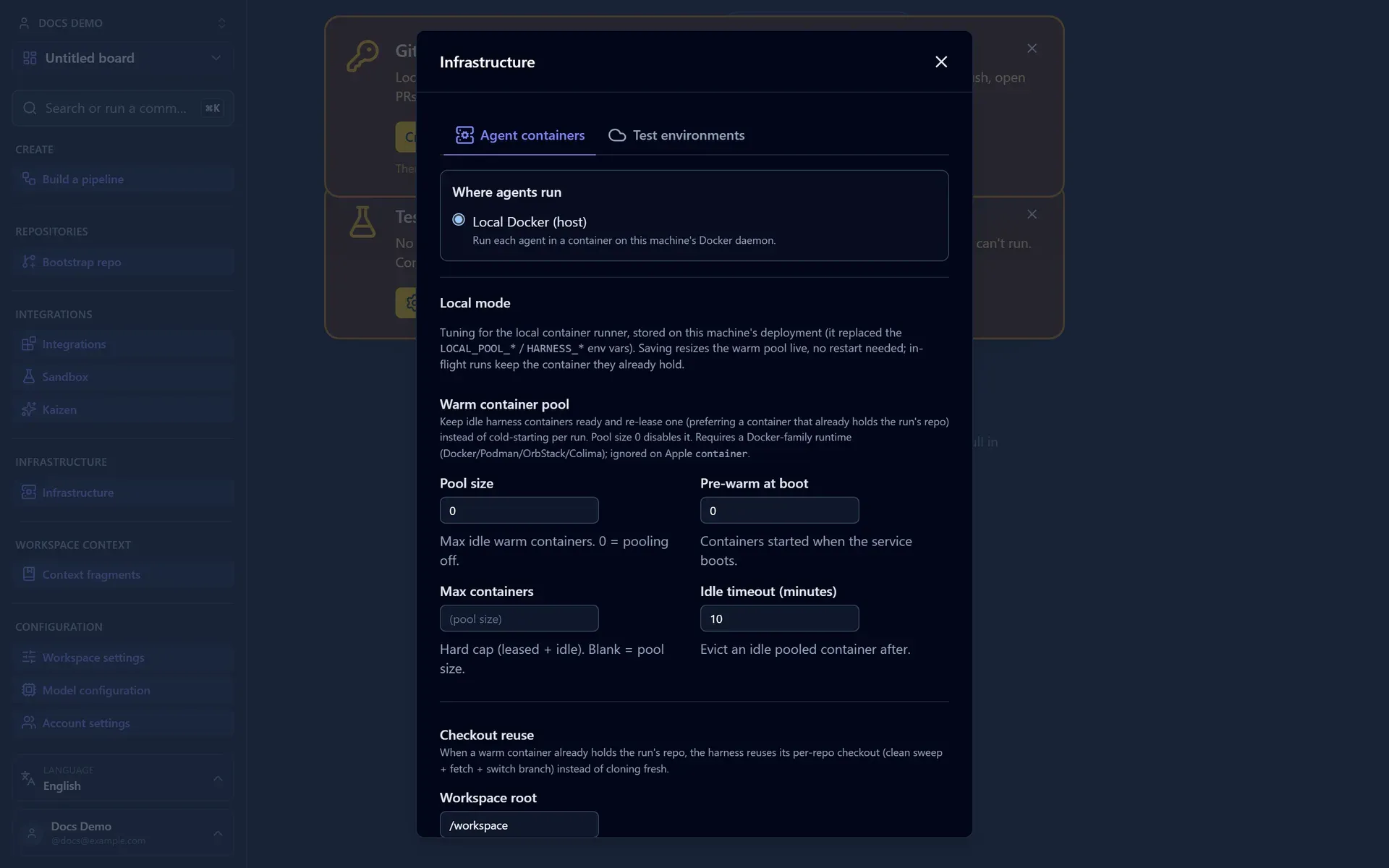
By default local mode does everything on the host container runtime: agent jobs run as local containers and the Tester stands up its dependencies with Docker-in-Docker. A workspace can opt out of either, independently, and hand that work to an external service instead. Both toggles live on the Ephemeral environments screen (local mode only) and each lights up only once its provider is registered:
- Delegate agents to a runner pool: container agent jobs dispatch to the registered runner pool instead of host Docker. With the toggle on and no pool registered, a run is refused at start with a clear message (register a pool first) rather than an opaque error.
- Delegate the test environment to a provider: flips the local-mode default Tester environment from local (host DinD) to ephemeral, provisioned through your registered environment provider. Per-service and per-task choices still win over the default. An ephemeral run is refused at start if the toggle is on with no provider connected.
Both default off. A single wrapper package can implement the EnvironmentProvider and RunnerPoolProvider ports together (Kargo, for example) to serve both concerns; see Add a Custom Provider. Ephemeral environments carry no enable flag: the module assembles wherever ENCRYPTION_KEY is set (always, in local mode), and stays inert until a service declares a provision type and a workspace handler is registered. See Provision Ephemeral Environments.
To run agents and previews on a local Kubernetes cluster instead, use the native Kubernetes backends. The cat-factory k3s command provisions a local k3d/kind/k3s cluster, wires least-privilege access, and hands off to the app to fill the connect form. See Deploy on Kubernetes → Local k3s guided setup. On Windows, install k3d and create the cluster first: Set Up a Local Kubernetes Cluster on Windows.
Models in local mode
A stock local install configures no model provider, so nothing is selectable until you set one up. You have several options, in rough order of "no cloud account needed":
- Your own local LLM is the natural fit for local mode. Run Ollama, LM Studio, llama.cpp, or vLLM on the same machine and add it under Settings → My local runners; the enabled models appear in the picker with no key and no spend. See Running on a local LLM.
- A provider key or subscription: connect an OpenAI/Anthropic/etc. key, or your personal Claude/GLM/Codex subscription, in the UI exactly as on a hosted deployment. See Connect a Model Provider.
- Cloudflare Workers AI over REST: off-Worker there is no
AIbinding, so Workers AI is served through Cloudflare's REST API and is gated onCLOUDFLARE_ACCOUNT_ID+CLOUDFLARE_API_TOKEN(mint a Workers AI API token; find the account id withwrangler whoami). Set both and theworkers-aimodels become selectable. - AWS Bedrock: local mode shares the Node runtime's provider setup, so Bedrock registers when you set
BEDROCK_REGIONplus AWS credentials (AWS_ACCESS_KEY_ID/AWS_SECRET_ACCESS_KEY, andAWS_SESSION_TOKENif you use one).BEDROCK_MODELSis the comma-separated allow-list (""allows all). See Configuration → LLM providers.
Forgot the PAT?
Local mode reaches source control through GITHUB_PAT (or GITLAB_PAT) and has no GitHub App connect flow, so without one every repo-operating step (clone, push, open PR or MR, CI gate, merge) is bound to fail at runtime. If you boot without one, Cat Factory does not leave you guessing: it logs a warning with a click-through token-creation link (scopes pre-selected) and shows the same one-click link as a dismissible banner over the board. Create the token, set the variable, and restart.
Web search (SearXNG)
Local mode ships web search on by default so agents can research without any per-account key. The deploy/local compose file includes a SearXNG service (behind a web-search profile), and applyLocalDefaults points WEB_SEARCH_SEARXNG_URL at it (http://localhost:8080). Start it with pnpm up (which brings up Postgres and SearXNG); pnpm db:up brings up Postgres only.
Only the host orchestrator queries SearXNG; agent containers reach search through the backend proxy, so no search endpoint is baked into a job. To turn it off, set LOCAL_WEB_SEARCH=off (the web_search tool is then not advertised). To use hosted Brave Search instead, set WEB_SEARCH_BRAVE_API_KEY. See Configuration → Web search.
Signing in
Local mode requires sign-in. Per-user features (personal subscriptions, your own provider keys) need a real identity to attach to, so the SPA shows a login screen rather than running anonymous.
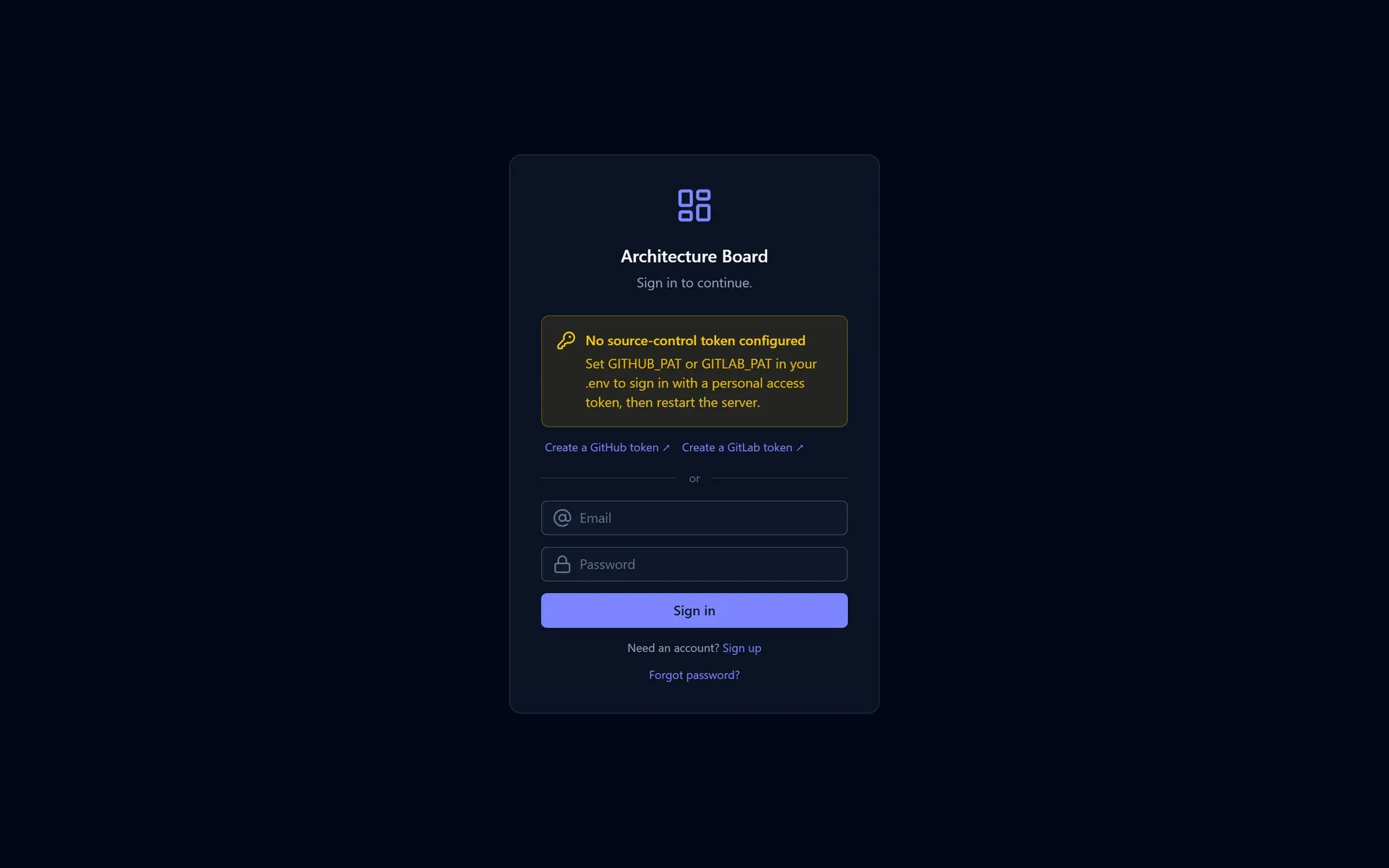
You sign in one of two ways:
- With the configured PAT (recommended). When
GITHUB_PATorGITLAB_PATis set, the login screen shows a one-click "Sign in with configured GitHub/GitLab PAT" button, and the token's account becomes your identity. The token stays on the server; it is never typed into or shown in the browser. Your choice is remembered, so a refresh, and a server restart, keep you signed in (theAUTH_SESSION_SECRETis stable, so the session survives reboots). - With email and password. On by default in local mode with open signup, so you can create a local account with no invite. Turn signup off with
AUTH_OPEN_SIGNUP=falseand password sign-in off withAUTH_PASSWORD_ENABLED=false.
The API itself still serves unauthenticated reads under AUTH_DEV_OPEN=true; a real session is what unlocks the per-user features. With no PAT configured, the login screen shows scopes-preset token-creation links for GitHub and GitLab so you can mint one.
GitLab in local mode
Local mode treats GitLab as a first-class source-control backend, not just a sign-in provider. Set GITLAB_PAT (scope api; add GITLAB_API_BASE for a self-managed instance) and a GitLab repo gets the same flow a GitHub repo does: the agent containers clone and push with the token, the CI gate reads pipeline status, mergeability and the real merge run against GitLab, and the executor opens a real merge request (reusing an open one on a resumed run). The provider is picked per repo from the clone-URL host, so a deployment can drive both.
A note on security
With the auth gate open, the server binds to all interfaces so that agent containers on native Linux Docker can reach the LLM proxy through the bridge gateway. That means anyone on your network can reach the API. Two ways to lock it down:
- Close the gate: set
AUTH_DEV_OPEN=falseand configure a real session secret. - Bind to loopback: set
HOST=127.0.0.1.
Loopback breaks native Linux Docker
HOST=127.0.0.1 is fine on Docker Desktop (host.docker.internal still resolves to the host) but not on native Linux Docker, where job containers reach the proxy via the bridge gateway IP. On native Linux, keep the default bind and close the gate instead.
Linking repositories
Local mode discovers repositories through your GITHUB_PAT rather than a GitHub App installation. With a PAT set, the Add from existing repo board flow works just like on a hosted deployment: the picker lists your repos (via /user/repos), with a search/filter box for accounts that expose many, and importing links and syncs the repo behind a service frame. The PAT's repo and workflow scopes light the flow up; CLI- and UI-linked repos share one synthetic installation, so the linkRepo helper still works and points at the same place. A GITLAB_PAT links GitLab repositories the same way. After linking, run pipelines as usual.
Next: set your model keys and toggles in Configuration.