Choose and Edit a Pipeline
For anyone deciding what should run against a task, and for whoever needs a chain the library does not ship. It covers the built-in catalog and what each preset is for, the builder edits that turn a read-only default into a pipeline of your own, and the step settings (gating, binary outputs, consensus) that only exist at design time. Starting a run and steering it is Run a Pipeline.
Anatomy of a pipeline
The build presets are a three-rung ladder. They vary in one thing: how much design a task gets.
| Preset | Steps | Pick it when |
|---|---|---|
| Simple build | Coder → Reviewer → Deployer → Tester → Conflicts → CI → Merger | The approach is not in question: a copy fix, a version bump, a one-line guard. |
| Standard build (default) | Architect → Architect Reviewer → Coder → Reviewer → Deployer → Tester → Conflicts → CI → Merger | The default. Every step always runs, no requirements interview and no human pauses. |
| Adaptive build | Task Estimator → (Architect + reviewer) → Coder → Reviewer → Deployer → (Tester) → Conflicts → CI → (Human Review) → Merger | A service's tasks vary enough in size that one fixed shape is wrong for most of them. |
Adaptive build sizes the task up first with one cheap Task Estimator call, then switches the bracketed steps on by estimate gate: the Architect above a complexity bar, the Tester above a low complexity or risk bar, and a Human Review wait on the PR above a high risk bar. So a trivial task runs the Simple-build shape and a risky one runs the full ladder, decided per task instead of once by whoever picked the pipeline. The Architect's reviewer carries no gate of its own: it cascades, skipped whenever the Architect was.
The Deployer, Conflicts, CI, and Merger are never gated. The Deployer provisions the environment the Tester reads and is a no-op on a service with no infrastructure; passing the guards is not negotiable on task size.
| Step | What it does |
|---|---|
| Task Estimator | Scores the task on complexity, risk, and impact so the gated steps have something to read. |
| Task Reassessor | Optional, and in no preset: re-scores those axes after the change lands, from the diff the run actually produced. See re-scoring the task. |
| Architect | Designs the approach. |
| Architect Reviewer | The Architect's companion. Rates the design and loops it back below threshold. |
| Coder | Clones the repo and writes the implementation. |
| Reviewer | The Coder's companion. Rates the change and loops it back for rework below threshold, immediately after the Coder, so review happens on fresh code. |
| Deployer | Stands up a Kubernetes, custom, or compose environment for the Tester. A no-op on a service with none. |
| Tester | Runs the software against the spec's acceptance scenarios and reports what it observed. |
| Conflicts Gate | Keeps the PR mergeable with its base, looping a resolver agent on conflicts. |
| CI Gate | Gates the PR on green CI, looping a CI Fixer agent on failure. |
| Human Review | Waits for a real human review on the PR. See Human review on the pull request. |
| Merger | Scores the PR and auto-merges within thresholds, or raises a review notification. |
Everything the presets leave out stays available as an opt-in step in the builder: the Requirements Reviewer (the iterative human answer/dismiss/re-review conversation, right for genuinely ambiguous scope and overkill for a task someone already wrote down), the Spec Writer and its reviewer, the Researcher, the Mock Builder, the Blueprinter, the Code Commenter, the documentation kinds, and any human approval gate. They are omitted from the presets rather than shipped disabled, so a preset's step list reads as exactly what it does.
Two brainstorm steps are opt-in the same way: a Requirements brainstorm and an Architecture brainstorm. Each proposes options with trade-offs and parks for you to converge on a direction, then hands that direction to the step it precedes. See Brainstorming a direction first.
Other built-in pipelines each new workspace seeds:
| Pipeline | What it's for |
|---|---|
| Triage & fix bug | A bug-fix front end: a read-only Bug Investigator explores the repo from the raw report, a Clarity Review gate triages it for fixability, the Spec Writer folds the clarified brief in, and a Repro Test writes a failing test before the Coder fixes it. See below. |
| Build & visual confirmation | Experimental. A UI-focused build whose UI Tester screenshots each screen, then a Visual Confirmation gate parks for a person to compare them against the uploaded reference designs. See Visual confirmation. |
| Frontend build & UI test | A frontend build that stands up a preview and drives it. See Preview and Test a Frontend. |
| Author a document / Quick document | A forward-authoring track that produces an in-repo Markdown document (PRD, RFC, ADR, design, runbook, …) shipped as a pull request. See Authoring a document. |
| Document business rules | Extracts the business rules a service implements into an in-repo document. |
| Ralph loop | A single persistent coding step that retries against your validation command until it passes, then gates and ships the PR (ralph → Conflicts → CI → Merger). The default for a Ralph-loop task. See The Ralph loop. |
| Run a spike / Run a spike (direct commit) | A timeboxed read-only investigation that answers a research question and delivers a docs/research/<slug>.md findings document. The default variant ships it as a PR through the review/merge tail; the direct-commit variant writes it straight to the base branch with no PR. The default for a Spike task. |
| Review a pull request | A read-only deep review of an open PR that returns prioritized findings; it writes no code and opens no PR. The default for a Review task. |
| Map service | Blueprint only. Run after bootstrapping to reconcile a repo onto the board. |
| Write spec | Spec Writer only. Regenerate a service's in-repo spec on its own. |
| Improve code comments | Code Commenter only, then the merge tail. Run standalone to refresh a repo's in-source comments; here it opens its own PR. |
| Plan initiative / Plan documentation refresh / Break down initiative | The planning presets, offered on initiative blocks. |
| Analyze environment | Reads a service's infrastructure and reports what it found. |
| Bug triage (recurring) / Tech debt | The recurring presets (see Schedule Recurring Work). |
Additional agent kinds include the Fixer (loops on failing tests inside the Tester gate), Bug Investigator, Playwright (runnable e2e tests from the spec's acceptance scenarios), Documenter, a tech-debt analysis step, and a Skill step that runs a repo-sourced Claude Skill picked per step; a deployment can also register its own agent kinds and pipelines.
Retired pipelines
A built-in pipeline is copied into every workspace when the workspace is created, so a preset the platform withdraws stays in the libraries that already have it. The app's pipeline-health advisory lists any such pipeline as retired, names what replaced it, and offers a per-row removal. A retired pipeline is no longer seeded into new workspaces and can no longer be reseeded.
Deleting a pipeline that a recurring schedule still points at is refused; repoint or remove the schedule first.
Pipeline purpose and task-type scoping
Every pipeline carries a purpose: Build, Bug fix, Documentation, Review, Research, Planning, or Media. The purpose narrows which pipelines a task can pick and which agents the builder offers:
- A Document task is offered only Documentation pipelines, a Review task only the Review pipeline, and a Media task only Media pipelines. Every other task type sees all pipelines. A pipeline with no purpose set is hidden from those three and shown for the rest.
- In the builder, a non-Build purpose hides the Implementation and Testing agent categories from the palette, since those pipelines write no code and run no tests. Leaving implementation or testing steps on such a pipeline raises a warning to remove them or switch the purpose back to Build.
Set the purpose (and a description) on a cloned pipeline in the builder.
Previewing a pipeline before you pick it
The pipeline picker in the add-task form and the inspector's Run settings is a master-detail list: hover a pipeline to see its description and its ordered steps as labeled chips, with a shield icon on any step that pauses for human approval, before you commit to it. Disabled-by-default steps are left out of the preview. A custom pipeline's description is editable in the builder ("shown when picking this pipeline"), so the pipelines you author explain themselves at selection time.
Triaging and fixing a bug
The Triage & fix bug pipeline is built for a bug report rather than a feature brief:
- The Bug Investigator is a read-only agent that clones the repo, reads the code against the raw report, and returns an enriched report, plus an optional working hypothesis, which it omits unless reasonably confident so a weak guess never misdirects the fix. It commits nothing and opens no PR.
- The Clarity Review gate then triages the report for whether it is actually fixable: are there repro steps, expected-vs-actual behaviour, the environment, and the affected area? It runs the same iterative answer → incorporate → re-review loop as the requirements reviewer, and the converged, clarified report becomes the task description the Coder builds from.
A bug pipeline that places a repro-test step also gets a machine-checked reproduction proof. That step declares the command that runs the reproduction, an optional setup command, and the test files that make it up. Between the coding agent settling and the pull request opening, the harness runs that command twice, in two fresh worktrees of the same clone: once against the pre-fix tree with the declared test files applied on top, and once against the final tree. Only red-then-green counts as reproduced; both phases use the same setup command and the byte-identical test files, so an environment problem that fails both can never pass as proof.
Anything else is recorded honestly as inconclusive, with both captured outputs and a one-line note. A failed verification is a repair rather than a run failure: the output goes back to the agent (which is told not to weaken the reproduction) while its budget holds, then degrades to inconclusive with the pull request still opening. A step that concedes the defect could not be reproduced records that declaration structurally, with the reason and the alternative verification it performed, so "could not be reproduced" is never indistinguishable from "nobody tried". A run whose repro-test step declared no runnable command behaves exactly as it did before.
Hover any step in the builder, the draft chain, or a board task card to see what that agent does: each kind's description shows as a tooltip.
The Ralph loop
A Ralph loop task runs a single coding step that retries until a command you supply passes, for work whose "done" is a check rather than a review: get the suite green, make the typechecker pass, port a batch of call sites. Create a task of type Ralph loop, put the spec in the description, and set two knobs in the inspector's Agent configuration panel:
- Validation command: the shell command run in the checkout after each iteration (for example
pnpm test && pnpm typecheck). Exit 0 means done. - Max iterations: the anti-runaway budget (default 10).
Each iteration is a fresh-context container run that works the spec, commits, and pushes; the harness then runs the validation command. On exit 0 the step completes and the PR flows through the standard Conflicts, CI, and Merger tail. On a non-zero exit with budget left, a new iteration starts with the previous validation output threaded in as feedback. When the budget is spent without passing, the run raises a decision notification and hands off to you rather than looping forever. The loop keeps an append-only progress log and survives restarts, and it opens the PR on the first iteration and amends the same branch on later ones. Its pl_ralph pipeline is the default for a Ralph-loop task.
Visual confirmation
Experimental
The Build & visual confirmation pipeline is flagged experimental in the library. Automatic screenshot capture needs the UI-tester image wired up (see The UI-tester image below); without it a person supplies the screenshots and reviews them, and the gate works the same either way. The reference side needs no upload: a design linked to the task contributes its own frames (see Design context → Renders), and uploading an image for a view overrides the design's frame for it.
This UI-focused pipeline runs Coder → Reviewer → Mock Builder → UI Tester → Visual Confirmation → the standard Conflicts → CI → Merger tail. A visual pipeline like this runs only on a frontend frame (or a frame a frontend binds to); the UI Tester builds that frontend, wires it to the backend under test and mocks other upstreams, and drives it in a real browser. See Preview and Test a Frontend for the frontend configuration this uses. The UI Tester captures a screenshot of each distinct view; the Visual Confirmation gate pairs those screenshots by view against the references it holds for the task (a linked design's retained frames, plus any image uploaded against the task) and parks for a person to compare actual against reference. From the gate you can:
- Approve — the change matches; the run advances to the merge tail.
- Request a fix — describe what's off and the Tester's Fixer addresses it, then the gate re-parks for another look.
- Recapture — re-run the UI Tester to refresh the screenshots.
When a linked design contributes nothing, or fewer frames than it has, the gate says which design and why rather than showing a short gallery that reads as complete.
It raises a visual-confirmation-ready notification and needs a binary-artifact store for the screenshots and the retained frames; the gate passes through when no store is wired. The store is configured per account under Account → Deployment settings (see Content storage).
The UI-tester image
The UI Tester drives a real browser, so it runs on its own executor image: the standard harness plus Playwright and Chromium, pnpm and yarn, a static file server and a headless JRE with WireMock. It is kept separate on purpose, so that a browser and a JVM are not pulled on the cold start of every Coder, Merger and CI Fixer run. A UI Tester step therefore runs in its own container, beside the one the rest of its pipeline shares.
Point your deployment at it before running the pipeline:
- Cloudflare — publish
cat-factory-executor-uiinto your managed registry (pnpm image:publish:ui) and add theUiTesterContainerclass plus itsUI_CONTAINERbinding, which the deployment template ships commented in place. - Node with a Kubernetes runner pool — set the pool's UI-tester image to a published
cat-factory-executor-uitag. - Local — nothing to do: the version-matched image is used automatically and pulled the first time a UI Tester step runs. Override it with
LOCAL_HARNESS_IMAGE_UI.
Until it is wired, a UI Tester step fails at dispatch and says which setting is missing. It is deliberately not run on the ordinary executor image instead: that image has no browser, so the step would spend a checkout, an install and several model turns before discovering it, and then report a generic failure to test rather than the missing wiring. Drop the UI Tester step from the pipeline to run the gate in its manual form.
Authoring a document
The document track produces a new in-repo Markdown document shipped as a pull request, the forward counterpart to the reverse-documentation agents (Documenter, Blueprinter) that describe existing code. Two pipelines seed it:
- Author a document: doc-researcher → doc-outliner (human gate on the outline) → doc-writer → doc-reviewer (an AI review loop, then a human gate on the converged draft) → doc-finalizer → Conflicts → CI → Merger.
- Quick document: doc-writer → doc-reviewer → the merge tail, for a small or low-stakes doc, so even a quick doc can't merge over a conflict or a red build.
A document task carries a document kind (PRD, RFC, ADR, design, technical reference, API, runbook, research report, or reference) plus optional audience, target path, and outline hints, which steer the doc agents' prompts. The doc-writer branches off base, writes the Markdown, and opens the PR through the same coding harness the Coder uses; the doc-finalizer polishes on the PR branch. The committed Markdown is the durable artifact, so no new storage is involved.
Editing pipelines
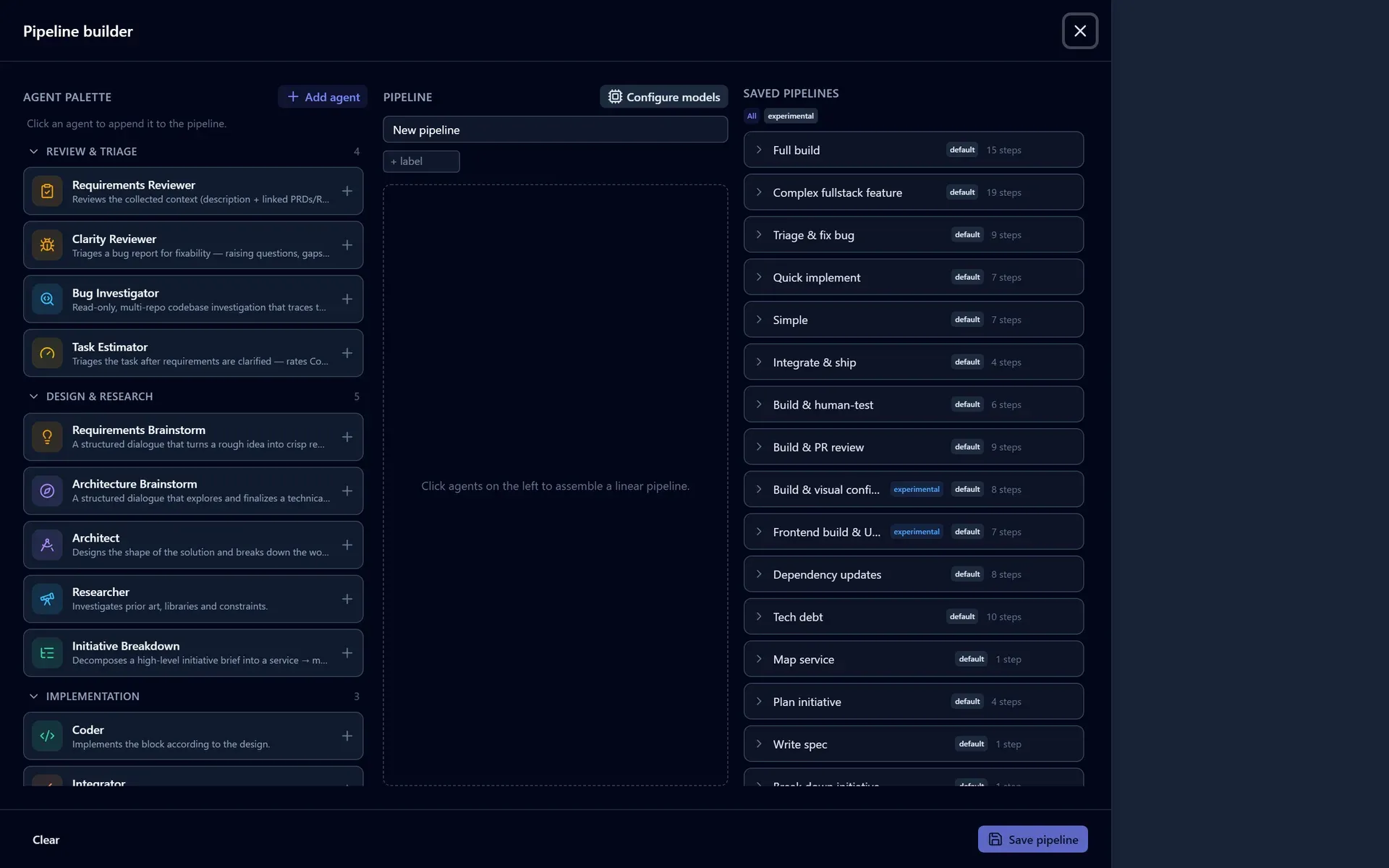
For the short version of the common edits (add a review step, add a gate, change a step's prompt, attach a skill), see the Cookbook. This section is the model behind them.
The built-in pipelines are read-only templates, but you can shape your own:
- Clone any pipeline, built-in or custom, into a new editable copy. This is how a read-only default becomes a starting point you can change.
- Edit a custom pipeline in place: reorder, add, or remove steps. Built-in pipelines carry a default badge and offer Clone instead of Edit.
- Disable a step without deleting it. A disabled step stays in the saved pipeline but is skipped at run start, so you can drop, say, the Researcher for a run without rebuilding the chain. At least one step must stay enabled.
On app open, a startup check surfaces pipelines that need attention: a custom pipeline that references an agent kind that no longer exists or has an invalid shape (offered for deletion), a built-in with an invalid shape (offered a reseed), and a built-in whose seeded definition has moved ahead of your stored copy (offered a reseed to adopt it). Reseeding a built-in restores its canonical definition while preserving your labels and archive state.
In the builder, the agent palette is grouped into collapsible categories (Review & triage, Design & research, Implementation, Testing, Documentation, and Gates & observability), with any custom kinds in a trailing bucket. The palette also opens on the basic tier and widens one cumulative level at a time (basic, intermediate, advanced) up to the whole catalog, so the everyday kinds are not scattered among every engine kind that runs a model. The same control appears on a model preset's per-agent overrides, which always keeps a kind the preset already pins a model for, whatever its tier, and offers a search that spans the whole catalog.
You can also tag a pipeline with labels and archive ones you no longer run to keep the list focused; archiving hides a pipeline without deleting it.
Rewriting an agent's prompt
A workspace can rewrite an agent kind's system prompt from the builder. Every version the workspace has run stays there to compare against and restore.
The history is an append-only log per workspace and agent kind. The newest revision is live, restoring an older prompt appends a copy of it, and back to the built-in is itself a recorded revision, so the workspace resumes tracking the shipped prompt as it improves rather than pinning a stale copy, and the revert is visible in the history. If two people edit the same prompt at once, the second save is refused rather than silently winning.
An override replaces the shipped role prompt only. The engine still layers its own surface directives and trait guidance on top, so a workspace cannot edit away a read-only guardrail or the answer-in-your-reply rule.
Output budgets
An agent kind's output-token ceiling has three tiers, narrowest winning:
- The step's own Max output tokens, set in the builder.
- The workspace's per-kind setting.
- The model route's default.
For a kind whose whole deliverable is one reply, such as a document author or a spec writer, the cap bounds the artifact rather than guarding against a runaway, and how long that artifact needs to be is a property of the work you are doing. Leaving a tier unset inherits from the next one down.
Binary-output steps
Some agent kinds produce binary artifacts rather than code: generated images, music, voice-over, 3D assets, rendered documents. A step of such a kind stores what it produces through a storage service its step selects.
Generating media
The quickest way to see this working is the built-in Media task type. Create a task, pick Media, describe what you want made, and start it: the Generate media pipeline runs one Media Generator step, which generates candidates, pauses for you to look at them, and stores the ones you keep.
It works on a fresh deployment because the storage it points at is the platform's own: a Platform asset storage service is in every workspace's service catalog, and the bytes land in the account's content storage. On a local deployment that is the filesystem with nothing configured. On any deployment that has configured no content storage at all, a Media run is refused at start with a message naming the fix, rather than generating and then having nowhere to put the result.
What the step generates with ships too. The Generate media pipeline selects Nano Banana, Google's Gemini image models, the one generative integration the platform registers for you. It needs one credential: a GEMINI_API_KEY from Google AI Studio, set as a capability credential on the workspace (or in the environment your runs dispatch from). Billing has to be enabled on the Google project, since none of these models has a free tier.
Without that key the run still happens: the agent is told the integration is unavailable and reports that as the reason nothing was generated, rather than quietly producing whatever its own model can draw. Register your own integrations beside it and select them on the step, and each one renders its own candidates for you to compare.
If your organisation already runs an asset store, register it as a foundational service with the asset-storage capability and point the step at that instead. The one thing you give up is the read-back below: the platform can only show you an artifact whose bytes it holds.
Configuring a generating step
Any agent kind carrying the binary-output trait gets this selection, whether it is the built-in Media Generator or one your deployment registers itself:
| Setting | What it does |
|---|---|
| Storage service | The catalog service every artifact is stored through. It must carry the asset-storage capability tag. |
| Context services | Further catalog services consulted for the scope of the generation: an inventory that can say what entities exist, which lack an asset, and how each is described. No capability tag is required. |
| Generative integrations | Which image, audio, video, or 3D APIs this step may call: the shipped Nano Banana, plus whatever your deployment registered. Leave it empty and the step generates through whatever its agent already has, such as a model with native image output. |
| Content types | What the step must deliver: image, audio, video, 3d-model, 3d-scene, or document. Every one must be covered by a selected integration. |
| Formats | Exact media types the step must deliver (model/gltf-binary, image/png). Every entry is required, not any-of. |
Content types and formats are two independent statements and both are enforced as written. Neither is derived from the current selection, so removing a generator reads as a break rather than as a change of requirements.
Formats exist because 3D is where the container is the requirement. PNG versus WebP is a genre question that belongs in the prompt, but GLB, USDZ, and FBX are all one content type and none substitutes for another: a Godot importer takes the first, a RealityKit pipeline the second, an art pipeline the third. Declare the format you need, not the set you would accept, because the agent has to name a concrete container on the vendor call. Matching is exact, with no synonyms mapped.
Generation options
Beside the selections above, a binary-output step can state the parameters every generation it makes must carry: reference images (each with the role it plays, such as style or subject), an instruction or masked edit of an existing artifact, a negative prompt, a fixed seed, an aspect ratio, an exact output size in pixels, an upscale factor, a transparent background, and seamless tiling.
These are statements about the deliverable, not preferences, and the platform checks them before the run starts rather than after it has spent anything. Two things can be wrong with one:
- Nothing you selected can be asked for it. A reference image handed to an endpoint with no image input, a seed asked of an API that has none. The step is refused, naming the option.
- Nothing you selected accepts the value. Every selected integration takes an aspect ratio and none of them takes
7:3; every one renders at an exact size and none renders at 96×96. The step is refused, and the message lists what they do accept, so the fix is picking one of those or selecting an integration that renders yours.
The second check is the one that catches a whole class of quiet damage. An endpoint that offers ten aspect ratios and is asked for an eleventh does not fail: it crops to the nearest one and returns successfully, and the artifact then passes every other check the platform can make. The consumer that rejects it is your game or your storefront, weeks later.
A value only SOME of your integrations accept is neither of those. If one of them takes 7:3 and another has written down a list without it, the step is not refused: which integration renders which artifact is the agent's call, and one that accepts your value is selected. The builder names the ones that will not take it, because the fix is either dropping them from this step or accepting that they will be sent something else. Read that line even though the step starts, since it is the crop above being reported in advance rather than discovered later.
Both checks are only as strong as what your deployment declared. An integration that has not stated which values it accepts might still serve the one you asked for, so the step starts and the builder says which of your integrations will actually honour it, rather than refusing a selection that is probably fine. Where no selected integration has stated anything, you see nothing new, which is the ordinary case until your deployment audits an endpoint.
An exact size states the delivered dimensions, so it cannot be combined with an aspect ratio or an upscale factor: each of those states them a second time and the two can disagree. The builder refuses that combination on the spot, and the fix is deleting whichever of the two is not the requirement.
When two of a step's selected integrations produce the same content type, the builder says so beside the step's prompt as an advisory. It refuses nothing: both selections pass every check the platform can make and exactly one is right, and the person who knows which is the person writing the prompt. The agent's brief states the overlap too and asks it to record which integration it used.
The engine gives the agent a brief under .cat-context/binary-output/ covering the storage service, the context services, and each selected integration (its content types, formats, endpoint, operating notes, API contracts, and the environment variable its credential arrives as). The credential's value never reaches a prompt.
Refusals are kept apart because different people fix them. A storage or context id that no longer resolves in the workspace catalog is refused at admission as binary_output_service_invalid, fixed by whoever manages the catalog. Everything about the generative side is binary_output_generator_invalid, and where that one is fixed depends on which fault it names: an unknown generator id is fixed in the deployment's build, while an uncovered content type or format, an unsupported generation option, or a value nothing accepts are all fixed in the step, by changing what it asks for or which integrations it selects. The refusal names the fault, so you do not have to guess which of the two you are holding. A generator step with no selection at all is refused at save.
Comparing and keeping what was generated
A generating step can be set to compare: it renders more than one candidate per subject, pauses the run, and shows them side by side. Keep one, or turn on multi-select and keep several, each under its own name. The Generate media pipeline ships with this on, because looking at two renders and picking one is the whole reason to run several image APIs at once.
Every candidate is written to your storage while you decide, since that is where the picture you are looking at comes from. Once you have chosen, the step is told what you discarded and clears those files up. The platform's own asset storage accepts that; whether your organisation's store does is its own answer, and the step's report says which happened.
The comparison window doubles as the record: once you have decided, it still shows what was compared, what you kept, and under which name. A step that generated only one candidate keeps it without asking and says so, so an unreviewed artifact is never presented as a reviewed one.
Reading the result back
After the run, the step's result window reports what was stored: each artifact's service, location, entity, and media type, whether it went where the step pointed it, and each counted loss on its own line (undeclared, unparseable, invalid, over the cap, or naming an unknown service).
For artifacts in the platform's own asset storage, the report also shows them: an image renders inline, anything else is named by its type, and both carry a link to open the file and one to save a copy wherever you want it. Artifacts in your organisation's own store show the location the agent recorded, which is what you paste into whatever reads that store, since the platform never held those bytes.
Estimating and gating expensive steps
The Task Estimator is an agent kind you can add early in a pipeline. After requirements are clarified, it scores the task on three 0–100% axes (complexity, risk, and impact) and shows them as a small estimate badge in the task inspector, with the model's rationale. The badge says which reading it is showing, because a forecast and a measurement of the same three axes are not the same fact: this one is labelled "forecast before the work started".
That estimate lets you gate expensive steps so they run only when the work warrants it. Open a step's gate controls and set minimum thresholds on any of the axes; the step then runs only when the estimate meets a threshold and is skipped otherwise, so light tasks bypass work their own diff cannot justify while risky ones still get it. This is how the Adaptive build preset switches its Architect, Tester, and Human Review on per task.
Gatability is a per-kind capability, so the controls appear on any step whose kind declares it, not only on companions. Three rules bind a gated step:
- It needs a step that PRODUCES an estimate earlier in the same pipeline (a Task Estimator, or the Task Reassessor below) to have something to consult.
- It must set at least one threshold, otherwise it would always skip.
- It may not also carry a human approval gate. Pick one.
A companion cascades with its producer: skipping the Architect skips its reviewer too, without a second threshold to keep in sync.
Re-scoring the task after the work lands
The estimate above is a forecast, made before anyone had written a line. The Task Reassessor is the other end of it: place it after the Coder and it reads the change the run actually made (the pull request's diff, read-only, in a container) and scores the same three axes against it.
It does two jobs, and which one you get depends only on what came before it in the pipeline:
- It corrects a forecast. With a Task Estimator earlier in the pipeline, the task keeps ONE set of ratings, now labelled "measured from the change that landed", with the forecast it replaced shown beside each axis. That is what makes a run's estimate reviewable after the fact: a task forecast at 30% complexity and measured at 90% is worth reading, and worth remembering the next time something similar is described the same way.
- It produces the ratings a pipeline never had. On a preset with no Task Estimator (Simple build, or a bug-fix pipeline), it is the only step that rates the task at all, so the ratings arrive after the fact rather than not at all.
The Reassessor is not in any shipped preset: it costs an extra read-only container run per task, so you add it in the builder where you want it. It is itself gatable, which is usually how you want it configured: measure the tasks the forecast called large, skip the rest.
Two limits worth knowing. It needs the run's pull request, and refuses to run without one rather than scoring an empty diff, so it has no use in a pipeline that opens none. And on a task that changed several connected repositories it reads the primary repository's change and says so in its rationale, rather than implying it weighed the whole set. It is never told the earlier forecast: an assessment handed the number it is revising anchors on it, and the movement between the two is arithmetic the platform does itself.
Multi-model consensus
On deployments where consensus is enabled, you can run certain steps through more than one model and reconcile the results instead of trusting a single pass. Eligible steps are the Architect, the Researcher/analysis kinds, the Reviewer, the Task Estimator, the PR Reviewer, and the document, design, and spec companions. Each offers three strategies:
- Specialist panel: several models reason in parallel under assigned roles, then a synthesizer combines them.
- Debate: models draft, critique, and refine over a set number of rounds (1–5).
- Ranked voting: models score candidates against a rubric and the scores are aggregated.
A panel is a workspace consensus group: define its participants (each a role plus an optional model) and an optional synthesizer model once, in the workspace's library, and reuse it across steps.
A step names a set of groups rather than one. At dispatch the engine picks the most demanding tier the task's estimate clears, and falls back to a plain single-agent run when the estimate clears none. So one step configuration covers "spend nothing on a trivial task, convene a full panel on a risky one" without a second pipeline.
The step returns output in the same shape as the single-model version, and the full transcript (each contribution, the synthesis, a confidence score, and any unresolved dissent) is viewable from the step. Consensus only applies to the eligible kinds; other steps run normally even if a config is present.
What a panel gives up is the working environment. Each participant is a single model call with no checkout, no shell and no MCP tool servers: it judges the material the run inlines for it. Most eligible kinds run in a container in their single-model form, so a step that had tool servers loses them when the panel convenes. It is not silent: the participants are told which servers they are without, and the step records each one under consensus_panel.
Next: start the pipeline you picked and steer it in Run a Pipeline, or put it on a schedule with Schedule Recurring Work.