Connect a Model Provider
For whoever supplies the models the agents run on. Cat Factory can reach models four ways, and a single run can mix them per agent kind. This page covers the options and how to connect a coding-plan subscription.
The four ways a model is served
| Source | How it is set up | When it applies |
|---|---|---|
| Cloudflare Workers AI | Register the Workers AI provider (the AI binding on Cloudflare, or CLOUDFLARE_ACCOUNT_ID + CLOUDFLARE_API_TOKEN over REST elsewhere). No provider key. | The low-cost fallback whenever a model has no richer flavour configured. |
| Direct provider API key | Connect the key in the UI (below). Stored encrypted under ENCRYPTION_KEY. | A model upgrades to its direct provider automatically once a key for that provider is in scope. |
| Vendor subscription or key | Connected in the UI (below). | A model runs in the Claude Code or Codex harness, authenticated with a coding-plan subscription or a vendor API key. |
| Your own local runner | Each user adds a runner (Ollama, LM Studio, and similar) in My local runners. No API key. | The enabled local models appear in the picker for that user's runs, resolved on their machine. |
When more than one source could serve a model, subscriptions win first, then a direct API key (a local runner counts as a direct-flavour key for the initiating user), then Cloudflare. Direct keys are the right path for org-wide and programmatic access.
First-run setup
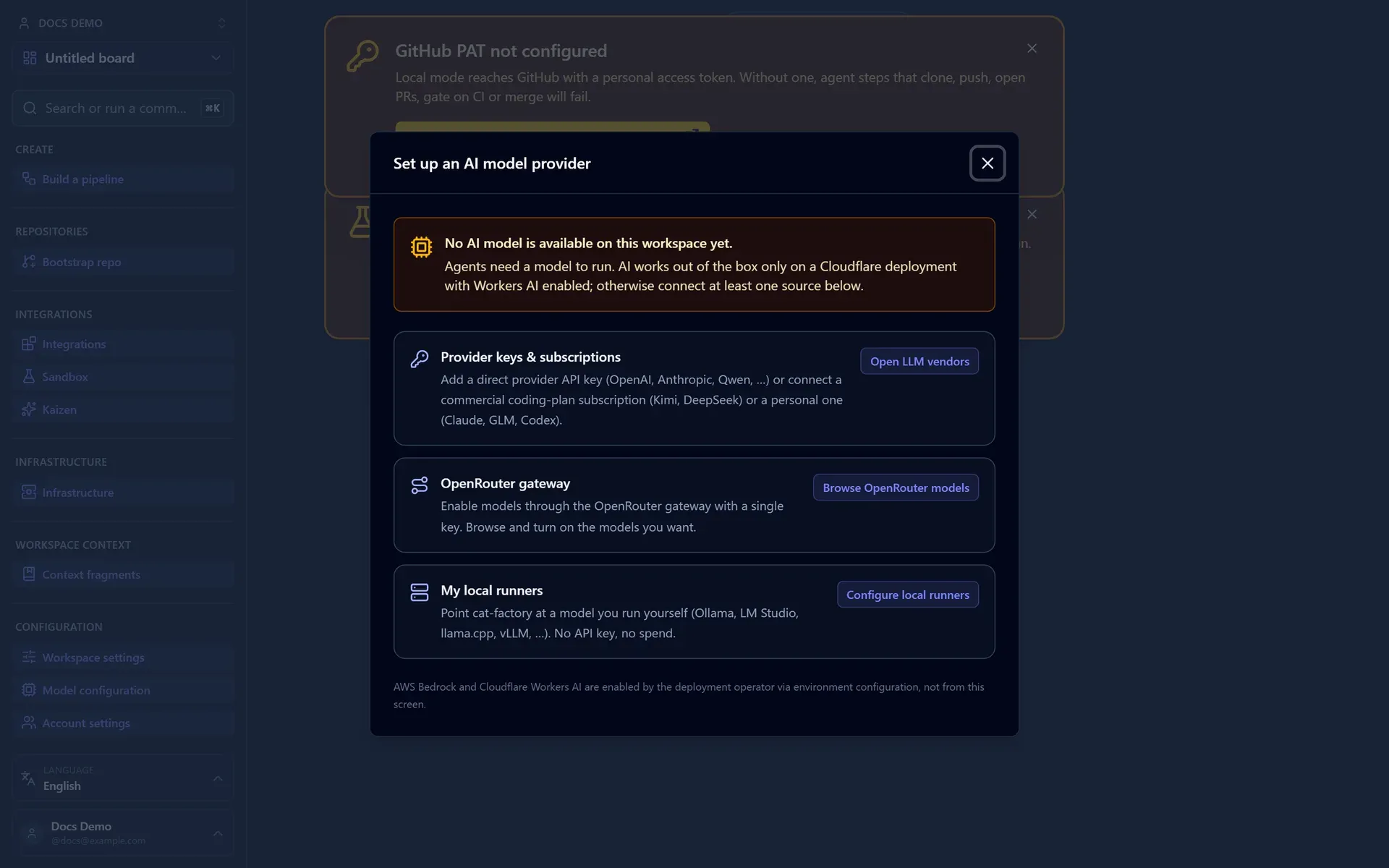
A fresh workspace with no usable model source shows a "No AI model configured" banner and opens a Set up an AI model provider prompt that routes you to provider keys, OpenRouter, or a local runner. If your default preset points at a model none of your connected sources can serve, the task inspector flags the mismatch so a run never silently falls back.
Connecting a direct provider key
Direct provider API keys (OpenAI, Anthropic, Qwen, DeepSeek, Moonshot, xAI, OpenRouter, and a self-hosted Bifrost or LiteLLM gateway) are onboarded in the UI and stored encrypted. Open Model providers from the sidebar's Models group. It splits credentials into horizontal tabs, one per kind:
- Workspace pool: pooled coding-plan subscriptions and commercial keys a team shares (Kimi, DeepSeek).
- Direct providers: per-vendor API keys that talk straight to the vendor (OpenAI, Anthropic, Qwen, DeepSeek, Moonshot, xAI).
- Proxies: OpenAI-compatible gateways that front many upstream models (OpenRouter, Bifrost, LiteLLM), kept separate because they are intermediaries, not vendors.
- Personal subscriptions: individual-use credentials each member connects for their own runs.
Each key is connected at one of three scopes, and a run draws from all the scopes that apply to it:
- Account: shared by every workspace in the organization.
- Workspace: limited to one board.
- User (your own
/mekeys): only your runs use them.
Connect more than one key for a provider and Cat Factory pools and rotates across them. A model's direct flavour becomes selectable as soon as a key for that provider is in scope; remove the last one and the model falls back to a subscription or Cloudflare. Because the keys are pooled and shared, this is the supported path for org-wide, programmatic, and unattended access, including the Claude and GPT models that a personal subscription keeps per-user.
Models served through OpenRouter, Bifrost, LiteLLM, and the other OpenAI-compatible direct providers back the repo-operating container agents (Coder, CI Fixer, and the repo bootstrap), not just the inline ones: the backend proxy forwards them the same way, so any connected provider is selectable for every agent kind.
The model picker tags each model with a Prompt caching or No prompt caching badge, derived from the provider that would actually serve it. A model on the Workers AI fallback shows no caching; connect a direct key for that provider and the same model upgrades to its cache-capable direct flavour, which the badge reflects. The step metrics bar then breaks out cached input tokens, and the observability dashboard reports the cache-hit rate per run. See Control Spend with Budgets → Prompt caching.
Aggregator gateways: OpenRouter, Bifrost and LiteLLM
Three of the direct providers are OpenAI-compatible gateways that front many upstream models:
- OpenRouter reaches hundreds of models through one key (
sk-or-…), and is a first-class entry in the Models section. Connect the key inline there, then Refresh catalog to browse OpenRouter's live model list, filter it, and tick the subset you want to enable (or hit Enable recommended for a curated starter set). Enabled models surface in the picker asopenrouter:<slug>with their live context window and per-million price, metered against your budget. When only an OpenRouter key is in scope, a logical model routes through OpenRouter automatically; add the native vendor key and it switches to the vendor. The gateway URL has a public default, so the catalog works as soon as the key is connected. - Bifrost and LiteLLM are gateways you host. Connect a virtual key (or the gateway's own API/master key) the same way, but the model stays unselectable until your operator sets that gateway's base URL (
BIFROST_BASE_URL/LITELLM_BASE_URL). A pipeline that pins one is blocked at start until then, rather than failing mid-run. Each ships one generic catalog entry, since what a gateway you run serves is your own configuration: repoint it and tune its pricing to match your gateway's actual routing. Bifrost names models by their canonicalprovider/modelpair (its entry defaults toopenai/gpt-4o); LiteLLM by themodel_namealiases in yourconfig.yaml.
AWS Bedrock
Bedrock is an operator-configured route rather than a key you connect in the app. When the deployment sets BEDROCK_REGION, AWS credentials, and BEDROCK_MODELS (Configuration), each catalog model the allow-list carries gains a selectable Bedrock route beside its other flavours.
The allow-list is both the resolver's boundary and the picker's enablement, parsed once from the same place, so the picker can never advertise an id the resolver would refuse. The catalog declares the unprefixed base model id and the platform matches your Region-correct entry onto it, so one catalog is correct in every Region.
Bedrock is the trusted, residency-guaranteed route the model access policy recognises, so it can let an otherwise blocked family through.
Connecting a subscription
A connected vendor credential lets agents run through the Claude Code or Codex harness, talking straight to the vendor outside Cat Factory's per-token spend metering. You connect it in the LLM Vendors settings; it stores no env vars and only needs ENCRYPTION_KEY so the token is encrypted at rest. What you connect differs by vendor (a coding-plan subscription for Claude, GLM, or Kimi; a plain API key for DeepSeek), and so does whether it can be shared, which sorts them into two groups.
Pooled (workspace) credentials
Kimi (Moonshot's coding plan) and DeepSeek (a commercial API key) both permit organizational use under their terms, so a workspace connects one credential and shares it across the team. Connect it once and every member's runs use it; add more than one and Cat Factory rotates across them.
Each credential in a pool carries two lifecycle controls, on its row in the LLM Vendors panel:
- Enable / disable: a disabled credential stays in the pool, listed and re-enablable, but is never leased and no longer makes its vendor or provider count as configured. Reach for it to park a credential that is rate-limited or under investigation without deleting it and having to re-paste the token later.
- Set as default: pins one credential per group as the preferred one, leased ahead of rotation. At most one default per group, and a disabled default is ignored (leasing falls back to rotating among the enabled credentials).
The same two controls apply to the direct-provider API-key pool, at every scope (account, workspace, and user).
Personal (individual-usage) subscriptions
Claude, GLM, and ChatGPT/Codex are licensed for individual use only. Anthropic's consumer Claude (Pro/Max), Z.ai's GLM Coding Plan, and a ChatGPT/Codex seat are each tied to one person, and their terms forbid sharing one credential across a team, at every tier (a ChatGPT Team or Enterprise plan hands out more individual seats). Cat Factory honours that with a per-user mode rather than a workspace pool:
- Each user connects their own credential, and only that user's runs can use it. Connecting (or disconnecting) one refreshes the model catalog, so the "No AI model configured" banner clears the moment the subscription makes a model usable, and a default-preset mismatch surfaces right away. The Connect button stays disabled until the form is ready, and tells you why: it shows "Sign in to connect a personal subscription" when you're signed out, "Enter your token to continue" with an empty token, or "Enter a personal password of at least 6 characters" until the password is long enough. The reason clears as soon as you satisfy it.
- These vendors are never poolable on any workspace, personal or org. The restriction is on sharing one subscription credential: an organization that wants every member to use Claude or GPT models sets a direct provider API key (
ANTHROPIC_API_KEY,OPENAI_API_KEY), which is the supported path for shared, org-wide access. The models stay available to the org; only pooling a personal subscription is off the table.
Why a personal password
A run that uses one of your personal subscriptions asks for a personal password to unlock it. What that password does is easy to misjudge, since it is tempting to assume it protects more than it does.
The password is about intentionality. Your token is stored double-encrypted: the system seals it with the deployment's ENCRYPTION_KEY, and your password seals it again underneath. The system seal is what actually keeps your token safe at rest. An external attacker, a database leak, or a curious teammate has no way past it without the system key, and your password makes no difference to any of them. It only comes into play against someone who already holds the system key.
What the password actually buys is twofold:
- It makes you unlock your own credential on purpose, so the system has no quiet way to pool an individual-use token across a team. A teammate who triggers a run starts a new run under their identity and is prompted for their own password, so they can never accidentally ride yours. Ownership is enforced by construction: a run records who initiated it and the executor only ever leases that user's credential.
- Underneath the system key, it is a second factor at rest. The one actor it guards against is a holder of the system key (an operator or insider), and defending against that actor is an explicit non-goal here, since anyone running the deployment could capture secrets regardless.
How unlocking works in practice
You are not re-prompted on every action. After you enter it once, the password is cached in your browser, so starting, retrying, and approving from your side runs ride along without asking again. The server never stores the password; it travels as a request header, never in a saved record.
To keep a long pipeline from lapsing halfway through, the cache is checked against an 8-hour expiry buffer: if a start, confirm, or retry finds less than eight hours of runway left on the cached password, it re-prompts you then, while you are present at the action, and refreshes the full window, rather than letting a nearly-expired credential fail on an asynchronous step while you are away.
Unlocking mints a short-lived, per-run activation (re-encrypted with the system key only, scoped to that one run) so the asynchronous container steps can authenticate while you are away. That activation is deleted the moment the run finishes, and a healthy run that you keep tending re-mints it on each interaction, so the activation only ever expires on a stuck or abandoned run. A background sweep reclaims any stragglers.
Responsible use
- Connect only your own subscription, and only where its terms permit individual use. For organization-wide use, use a direct provider API key instead.
- Use a strong password. It is the second factor protecting your token at rest and is never recoverable from the server: if you forget it, you reconnect the subscription. All your personal subscriptions share one password, so a run that touches several unlocks them together.
- Don't pin individual-usage models on work meant to run unattended.
Recurring pipelines can't use personal subscriptions
A scheduled pipeline fires with no one present to enter a password, so Cat Factory refuses to start one that resolves to an individual-usage model. Point recurring work at a pooled subscription, a direct API key, or the Cloudflare default.
Using your subscription from a script
Work you drive yourself over the public API is not the unattended case above: you are present when it starts, so you can supply the password. It needs two things.
Mint the API token with Runs as: me (Integrations → API access tokens). An ordinary token belongs to the workspace rather than to you, so it cannot reach anyone's personal subscription. GET /api/v1/models still lists such a model, and the row says which situation you are in: personalSubscription: true means it runs on a credential that belongs to a person, and subscriptionConfigured: true means that person does hold a live subscription for its vendor. A workspace token therefore reads available: false beside subscriptionConfigured: true, and both are true at once: the model is wired, and this token may not spend it. The fix is a token that runs as you, not a provider key.
Then send your personal password in the X-Personal-Password header on every call that starts, retries, or answers a decision on such a run. It is never stored anywhere, by design, so ask for it when your program starts and keep it in memory rather than in a config file next to the token. A call that needs it and lacks it comes back 428 credential_required, naming the vendor.
Running on a local LLM (Ollama, LM Studio, …)
You can point agents at a model running on your own machine (Ollama, LM Studio, llama.cpp, vLLM, or any OpenAI-compatible server), so no tokens leave your network and there is no per-token spend. Like personal subscriptions, runners are per-user: each person configures their own, and only that person's runs use them.
Add one under Settings → My local runners:
- Pick the runner type (the base URL is prefilled, e.g.
http://localhost:11434/v1for Ollama,http://localhost:1234/v1for LM Studio) or choose Custom and enter your own URL. An API-key/bearer token is optional, for a runner that requires one. - Cat Factory probes the runner (its
/v1/models) and lists the models it found. Enable the ones you want to use. - Set Image support on each enabled model, or leave it at Not set and let the recognised open-weights families answer. This is what decides whether a run's design renders and screenshots reach the model, and a local model has no catalog entry to read it off, so the option is here. See Design context → Locally-run models.
- The enabled models appear in the picker as a direct-flavour model, with no API key. When you start a run, the proxy resolves your runner's endpoint for that step.
A model is only offered once you've enabled that specific model id, so a pin to a model you later disable is caught at the pipeline-start guard rather than failing mid-run.
If a runner reports that some of its enabled models could not be read and were discarded, re-select the ones you want and save. The message is there because a discarded list and a runner nobody ever enabled anything on both render as zero models, and only one of them is fixed by re-ticking.
Local runners must be reachable from the backend
The base URL is called server-side (both the test probe and the run-time proxy), so it is constrained to an allow-list. Loopback only by default: localhost and the loopback addresses are always accepted, and public hosts and the cloud-metadata address (169.254.169.254) are always rejected.
Private-LAN reach (RFC1918, IPv6 ULA, and mDNS .local) is an operator opt-in, LOCAL_MODELS_ALLOW_LAN=true. It is off by default because the endpoint is fetched server-side, so on a shared deployment LAN reach is an internal-network SSRF grant. Local mode turns it on, being single-tenant.
Redirects are followed one hop at a time and every hop is re-checked against the same policy, and URLs that embed credentials, a query string, or a fragment are refused, so a runner cannot bounce the backend to a public host or the metadata endpoint. On a cloud deployment the backend cannot reach a runner on your laptop; local runners are intended for local mode or a self-hosted backend on the same network.
Subscription-only models
Connecting a subscription unlocks models that have no Cloudflare or API-key flavour, such as the Claude Fable 5, Claude Opus 5, and Claude Sonnet coding-plan models and the Codex GPT models. Because they have no fallback, they only appear once the matching subscription is connected, and inline steps (such as the requirements reviewer) fall back to the deployment's default routing rather than using them. Claude Fable 5 is the top-tier Claude option: it runs through the Claude Code harness on a connected subscription, or pay-as-you-go through OpenRouter (anthropic/claude-fable-5) when you connect an OpenRouter key. The built-in presets target Claude Opus 5, so select Fable 5 explicitly (or build a preset for it) when you want it.
The curated claude-opus catalog entry always tracks Anthropic's current Opus, which is Claude Opus 5: a 1M-context agentic coding model at the same price as Opus 4.8, served through the Claude Code harness on a connected subscription or pay-as-you-go through OpenRouter (anthropic/claude-opus-5). A task pinned to claude-opus picks up the new model with no migration. Earlier Opus versions are no longer curated entries; reach a specific one through the per-workspace OpenRouter catalog.
Model presets
Whichever source serves a model, you assign models with presets under Configuration → Model Configuration. A preset names a single base model for every agent kind, plus optional per-kind overrides (point the Architect at a stronger model while everything else stays on the base). Exactly one preset is the workspace default. Every new workspace seeds four built-ins, Kimi K2.7, GLM-5.2, Claude Opus 5 and GPT-5.6 Sol, and you can add your own.
The last two run on a subscription or through OpenRouter rather than on a key of their own: Claude Opus 5 on a connected Claude subscription, GPT-5.6 Sol on a ChatGPT subscription through Codex, and either of them pay-as-you-go through OpenRouter when no subscription is connected. So a workspace with only an OpenRouter key can still select them, and a connected subscription takes over automatically once it is there.
Which one is the seeded default depends on the deployment: Kimi K2.7 (Cloudflare-served, no key) on Cloudflare and Node, and Claude Opus 5 on local mode, where a connected Claude subscription is the natural fit. The default is applied only when a workspace is first seeded, so your own choice of default is always preserved afterward. A deployment wrapper can override the seeded default at boot (defaultModelPresetId on start/startLocal/createApp).
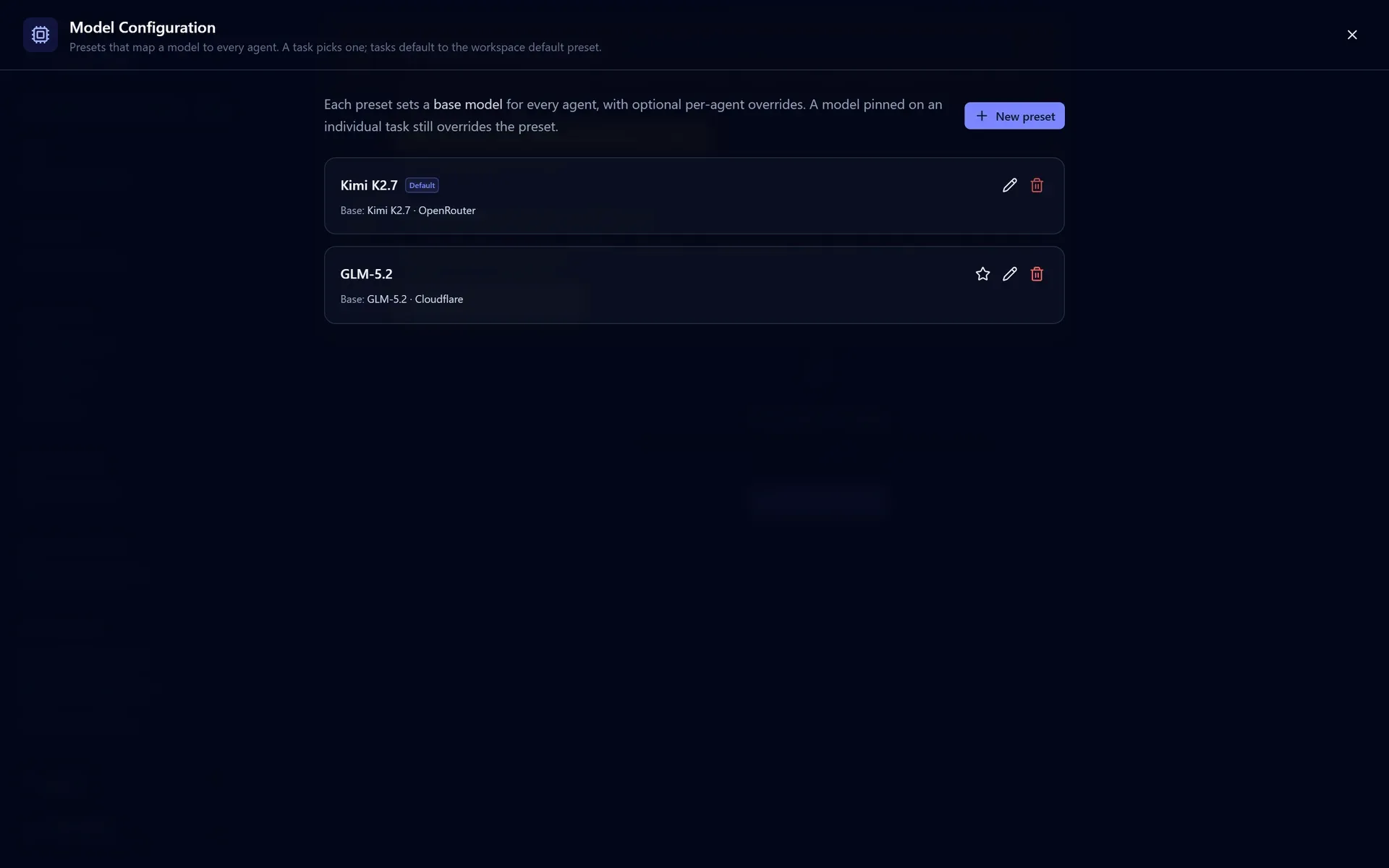
A task picks its preset in the new-task form or the inspector; changing it affects only the steps that haven't started yet. Reserve stronger models for architecturally significant kinds and keep cheaper ones on routine steps. See Choosing models and Control Spend with Budgets.
Route order per preset
A model can be reachable more than one way at once: a flat-rate subscription, a direct vendor key, an aggregator gateway, a residency-guaranteed route, Cloudflare. Which one a run takes is a route order you set on the preset row, so one workspace can hold a compliance preset pinned to a residency-guaranteed route and an everyday preset riding a subscription.
A preference reorders, it never filters. Any route you do not name is appended in the default order, so naming three routes cannot make a model whose only route is the fourth unresolvable. The order the block's preset declares is what both the start guard and every dispatch resolve against, so an inline call and a container step cannot disagree about which route a step took.
Keeping built-in presets current
The built-in presets carry a version. When a Cat Factory upgrade ships a newer version of a built-in (or adds a new one), the board shows a once-per-session model preset updates advisory. Adopting it reseeds that preset: it takes the refreshed built-in, repairs drift, or materializes a newly-added built-in. It is opt-in and never silently rewrites a preset you have edited, so a customized preset stays as you left it until you choose to reseed.
Restricting model families
An account admin can restrict which model families the account may use, so residency or vendor policy is enforced centrally rather than per workspace. The setting is Model access policy under Account / Team settings (admins only; it is hidden in plain local mode).
A model family is a coarse group of the built-in catalog: claude, openai, gemini, llama, qwen, kimi, deepseek, glm. Choose a Policy mode:
- No restriction (the default).
- Block listed families: the listed families are refused.
- Allow only listed families: everything outside the list is refused.
Because residency risk is a property of the serving route rather than the weights, the policy evaluates the family together with the provider that would actually serve it. You can mark trusted (residency-guaranteed) routes (AWS Bedrock today): a blocked family stays usable when it is served over a trusted route. An "Operating region" selector offers one-click preset templates (for example "Block China-hosted families" or "residency-guaranteed routes only") that fill the policy in for you to adjust.
When a pipeline pins a model from a blocked family, the run is refused at start with a clear error naming the blocked models, rather than silently rerouting: pick a model from an allowed family or a trusted route, or ask an admin to adjust the policy.
Next: try two models against each other before you commit with Compare Prompts and Models in the Sandbox, or turn a ready task into code with Run a Pipeline.