Configuration
For whoever owns the deployment's secrets and toggles. It is the reference for every environment variable you set when deploying Cat Factory, grouped by concern: authentication, model providers, infrastructure, service wiring, and feature toggles. The full generated list of variables, including ones no page here narrates, is Environment Variables.
When a required value is missing
A mandatory variable that is missing or invalid does not crash-loop the container. The backend starts anyway and serves a minimal fallback: the health check returns 200 with status misconfigured (so the orchestrator keeps the container alive instead of restarting it in a loop that hides the problem), and the SPA branches to a full-screen Backend not configured screen listing each problem with the variable name, what it is for, how to fix it, and a link to the matching documentation. Only variable names and remedies are shown, never any secret value, so the screen and the matching boot log are safe to share. The same structured problem list is returned as a 503 to non-browser callers.
The values validated this way include DATABASE_URL, ENCRYPTION_KEY (present, valid base64, decodes to ≥ 32 bytes), AUTH_SESSION_SECRET, HARNESS_SHARED_SECRET, TELEMETRY_DB (on the Worker), the primary DB binding (on the Worker), a login provider on a remote deployment, the container-executor wiring, a DB_SCHEMA that isn't a valid Postgres identifier, and malformed AGENT_MODELS JSON. GITHUB_APP_PRIVATE_KEY (and the privileged App key) must be a PKCS#8 PEM; a GitHub-issued PKCS#1 BEGIN RSA PRIVATE KEY is rejected with the exact openssl pkcs8 -topk8 conversion to run. Setting REDIS_URL without the optional ioredis package installed is also fatal, with the pnpm add ioredis fix. Fix the listed values and reload.
Warnings that don't block boot
Some misconfigurations are logged as a single structured warning (with a doc link) and boot continues on the built-in default rather than stopping:
- A numeric knob set to a non-numeric value (for example
AGENT_MAX_OUTPUT_TOKENS,CONTAINER_MAX_AGE_MINUTES, or any of the retention-day vars) logsNAME is set to "…", which is not a number — ignoring it and using the built-in defaultand falls back. - Only one half of
CLOUDFLARE_ACCOUNT_ID/CLOUDFLARE_API_TOKENbeing set names the missing half. REDIS_URLset but unreachable: a boot probe logs the credential-freehost:portand aredis-cli -u <REDIS_URL> pingcheck to run, then continues (cross-node coordination stays off until Redis answers).- In local mode, a
GITHUB_PATthat fails a quickGET /userprobe (revoked, forbidden, or missing therepo/workflowscopes) logs a warning with a pre-scoped token-creation link.
One boot check is deliberately fatal-then-recoverable: when the database refuses the connection on a loopback host (a localhost that resolves to IPv6 ::1 on Windows or Docker Desktop, a common footgun), the misconfigured screen names DATABASE_URL and the 127.0.0.1 fix, rather than crash-looping. A refused connection to a remote database still crashes and retries, so a transient outage isn't frozen behind the screen.
Elaborated failure messages
Runtime failures an operator has to act on now carry a structured cause, a fix, and a doc link while preserving the original error text: rejected GitHub/GitLab API calls (per HTTP status), GitHub App installation-token mint failures, webhook signature rejections (logged operator-side with the env var to compare, while the caller still gets a terse 401), credential-decryption failures (which name whether the ENCRYPTION_KEY was rotated or a stored secret is corrupted), unsupported model or Bedrock models, and container/runner dispatch failures (a 404 names a stale executor-harness image). These surface in the boot log and, where they belong to a run, on the run's step (see Observability → Run and step diagnostics).
Health vs. readiness
The Node backend exposes two public endpoints. GET /health is a static liveness signal (200{status:"ok"}, or misconfigured above) that your orchestrator restarts on. GET /ready is a readiness signal a load balancer drains on: it round-trips the Postgres pool with a bounded SELECT 1 and checks the pg-boss worker, returning 200 {status:"ready"} or 503{status:"not_ready"} with a per-check breakdown, and flips to not-ready the moment graceful shutdown begins. The Cloudflare Worker has no long-lived process and no readiness endpoint.
Authentication
A deployment can offer three sign-in providers in any combination: GitHub OAuth, Google OAuth, and email/password. Auth turns on as soon as any provider is configured together with a strong AUTH_SESSION_SECRET; each provider stays off until its own credentials are present. Regardless of how people sign in, repository access comes from the Register the GitHub App installation unless a run's initiator has stored a personal token, so a Google- or password-only user works fully. See Which credential a run pushes with. For who is allowed to create an account and how roles and invitations work, see Invite and Manage Your Team.
| Variable | Purpose |
|---|---|
AUTH_SESSION_SECRET | Signs session tokens (≥ 32 chars). Auth fails closed without it, whichever providers are set. |
GITHUB_OAUTH_CLIENT_ID | The GitHub App's OAuth client ID, for "Login with GitHub". |
GITHUB_OAUTH_CLIENT_SECRET | The App's OAuth client secret. |
GOOGLE_OAUTH_CLIENT_ID | Google OAuth client ID. Both Google vars must be set, or Google login stays off. |
GOOGLE_OAUTH_CLIENT_SECRET | Google OAuth client secret. |
GOOGLE_OAUTH_REDIRECT_URL | Optional. Explicit callback; defaults to ${origin}/auth/google/callback. |
AUTH_PASSWORD_ENABLED | Set to true to offer email/password signup and login. |
AUTH_TRUST_PROXY | Let the password throttle read the client address from x-forwarded-for instead of the socket peer. Set it only when a proxy you control terminates every request: otherwise the header is attacker-supplied and a client-chosen address defeats the throttle. Node and local only; the Worker reads cf-connecting-ip, which its edge injects and overwrites. |
AUTH_TRUST_PROXY_HOPS | How many trusted proxies sit in front of this process, used to pick the client hop out of an x-forwarded-for chain (default 1; a CDN plus a load balancer is 2). A shorter chain is discarded in favour of the socket peer. |
AUTH_ALLOWED_EMAIL_DOMAINS | Comma-separated domains allowed to self-sign-up without an invite (password/Google), and allowed to sign in with a PAT. Empty means invite-only. |
AUTH_ALLOWED_LOGINS | Comma-separated GitHub/GitLab logins allowed to sign in with a PAT. |
AUTH_ALLOWED_ORGS | Comma-separated orgs whose members may sign in with a PAT. |
GITHUB_APP_ID | Identifies the GitHub App used for repository operations. |
GITHUB_APP_PRIVATE_KEY | PKCS#8 private key that signs App requests and mints installation tokens. |
GITHUB_WEBHOOK_SECRET | Verifies inbound webhook payloads. Verification fails closed on an empty secret, so set a non-empty value on any deployment that receives GitHub webhooks. |
GITHUB_APP_SLUG | The App's URL slug, used to build installation links. |
GITHUB_API_BASE | GitHub API base. Defaults to https://api.github.com; override for GitHub Enterprise. |
GITHUB_OAUTH_BASE | OAuth host. Defaults to https://github.com; override for GitHub Enterprise. |
GITHUB_PRIVILEGED_APP_ID | Optional second App that can create org repos. See Programmatic repository creation. |
GITHUB_PRIVILEGED_APP_PRIVATE_KEY | PKCS#8 private key for the privileged App. Both vars must be set, or the tier stays off. |
New-user creation is invite-only unless an email domain is allowlisted: a person gets in by redeeming an email invitation or by signing up with an address on AUTH_ALLOWED_EMAIL_DOMAINS. With neither, signup is refused.
Password sign-in is rate-limited on a durable, cross-replica ledger rather than per process, so the throttle holds on a multi-replica deployment. It applies a burst cap per IP and email pair plus an aggregate per IP against credential stuffing. An in-process counter remains as the backstop for when the ledger itself is unreachable.
A remote (hosted) Node deployment has no anonymous tier: it fails to boot unless at least one provider is configured (GitHub OAuth, Google OAuth, or AUTH_PASSWORD_ENABLED with a strong AUTH_SESSION_SECRET). Users can also sign in with their own GitHub or GitLab PAT: they paste the token, the server resolves it to their account, and the same AUTH_ALLOWED_LOGINS / AUTH_ALLOWED_ORGS / AUTH_ALLOWED_EMAIL_DOMAINS allowlists decide who gets in (it fails closed when all three are empty). Local mode is the exception: it signs in with the deployment's configured PAT or a local password. GitLab PAT sign-in is offered only when the deployment has a GitLab connection configured (GITLAB_TOKEN, below); GitLab group membership then counts toward AUTH_ALLOWED_ORGS, matching GitHub.
What a personal access token can do on the run path
A PAT is the operational credential on two deployment shapes, not just a sign-in identity. In local mode one token is both the identity and what every agent step clones, pushes and merges with. On a hosted deployment, a run initiator's stored github_pat outranks the GitHub App installation on the run path, unless the workspace turns that off. On both, a token too narrow for the work would otherwise reach its first failure several steps into a pipeline, as a 403 out of a container.
Three surfaces report what the token in use can actually do, from one classification and one required-scope list: the connect form's warnings when a token is stored, the local deployment's boot log, and a check on board load that resolves the token a run would present through the same path the dispatch mint uses. That last one raises a banner only on an established blocking gap or a rejected token, and names whether the credential is the deployment's or the signed-in user's. See Troubleshooting → a step fails cloning, pushing or merging.
The token's raw scope list is deliberately not published on that response: any member can read it, and the breadth of a shared deployment credential is not a member-level fact. The per-capability verdict is what a reader can act on. None of this narrows a token either. Mint a fine-grained PAT restricted to the repositories the deployment works on rather than relying on a check to catch a broad one.
GitLab (source control)
GitLab is a first-class source-control backend on every runtime, not just local mode. It is opt-in and off until you set a token. With it configured, a GitLab repo clones, pushes, gates on real CI, and merges through a real merge request, and users can sign in with a GitLab PAT. See Connect a Repository → GitLab.
| Variable | Purpose |
|---|---|
GITLAB_TOKEN | Enables GitLab on Cloudflare and Node. In local mode the equivalent is GITLAB_PAT. Needs the api scope. With ENCRYPTION_KEY also set, workspaces can connect their own GitLab accounts with a personal access token. |
GITLAB_API_BASE | Optional. GitLab REST v4 base for a self-managed instance, e.g. https://gitlab.example.com/api/v4. Defaults to the public GitLab API. |
GITLAB_WEBHOOK_SECRET | Optional. Verifies inbound GitLab webhook payloads (merge request, issue, push, pipeline). |
GITLAB_CONNECTION_ID | Optional. Logical id for the GitLab connection. Defaults to gitlab. |
GITLAB_API_BASE also decides which host agent containers clone from, so a self-managed instance needs it set even when nothing else about the deployment does. On Cloudflare the platform hands that host to each container. If you run a self-hosted runner pool, set GITHUB_ALLOWED_HOSTS to your GitLab host on the executor-harness container as well: it is the harness's allow-list of hosts it will send a clone credential to, it defaults to github.com, and without your host on it every GitLab clone is refused.
LLM providers
Direct provider API keys (OpenAI, Anthropic, Qwen, DeepSeek, Moonshot, xAI, OpenRouter, Bifrost, LiteLLM) are onboarded in the UI, scoped to an account, workspace, or user, pooled, and stored encrypted under ENCRYPTION_KEY. The same is true of vendor credentials: a coding-plan subscription (Claude, GLM, or Codex, kept per-user) or a poolable vendor credential (Kimi, DeepSeek), run through the Claude Code or Codex harness. None of these needs a provider env var; they only need ENCRYPTION_KEY set. Local runners (Ollama, LM Studio, …) are likewise pure per-user UI configuration with no deployment env var. See Connect a Model Provider.
What stays in the environment is the Cloudflare Workers AI fallback, AWS Bedrock, the aggregator-gateway base URLs, and routing defaults:
| Variable | Purpose |
|---|---|
CLOUDFLARE_ACCOUNT_ID + CLOUDFLARE_API_TOKEN | Serve Cloudflare Workers AI over REST off Cloudflare (no provider key; optional CLOUDFLARE_AI_GATEWAY). On the Worker, the AI binding serves it instead. |
OPENAI_BASE_URL / QWEN_BASE_URL / DEEPSEEK_BASE_URL / MOONSHOT_BASE_URL / XAI_BASE_URL | Optional base-URL overrides for the OpenAI-compatible direct providers (the keys themselves come from the UI pool). |
OPENROUTER_BASE_URL | Optional. Overrides the OpenRouter gateway; defaults to the public gateway (https://openrouter.ai/api/v1), so OpenRouter works with just a connected key. |
BIFROST_BASE_URL | Required to enable Bifrost. Your self-hosted Bifrost gateway URL, e.g. http://localhost:8080/v1. Until it is set, a connected Bifrost key yields no selectable model. |
LITELLM_BASE_URL | Required to enable LiteLLM. Your self-hosted LiteLLM gateway URL. Until it is set, a connected LiteLLM key yields no selectable model. |
BEDROCK_REGION + AWS credentials + BEDROCK_MODELS | AWS Bedrock, via @cat-factory/provider-bedrock. BEDROCK_MODELS="" (set but blank) means "allow all". |
With no Cloudflare provider registered and no keys connected, a model has nothing to resolve to (the picker shows nothing selectable). Default routing is tunable with AGENT_DEFAULT_PROVIDER, AGENT_DEFAULT_MODEL, AGENT_DEFAULT_TEMPERATURE, AGENT_MAX_OUTPUT_TOKENS, and per-kind overrides via AGENT_MODELS; a workspace can override the model per agent kind at runtime (see Choosing models).
Credential encryption
One shared master key encrypts every integration's per-workspace credentials at rest: connected Jira sites, runner-pool API tokens, environment-provider auth, Slack bot tokens, and pooled or personal model subscriptions. The cipher domain-separates per integration internally, so a single key is safe across all of them.
| Variable | Purpose |
|---|---|
ENCRYPTION_KEY | Base64 key, ≥ 32 bytes decoded (openssl rand -base64 32). Required. The always-on Jira task-source integration fails to boot with a loud config error until it is set. |
Use one stable key
A single ENCRYPTION_KEY backs all of these integrations. Use the same key value across restarts and replicas, or encrypted credentials become unreadable. If a credential can't be decrypted (the key was rotated or regenerated), the error names the key and the affected credential and tells you to restore the original key or re-enter that credential; one broken credential is isolated, so unrelated providers keep working rather than the whole config failing.
Spend caps (operator ceilings)
Workspace, account, and per-user monthly budgets are set in the UI (see Control Spend with Budgets). Two optional env vars let an operator impose a hard ceiling that a user cannot exceed from the UI:
| Variable | Purpose |
|---|---|
BUDGET_MAX_MONTHLY_PER_ACCOUNT | Caps the per-account monthly limit. It clamps whatever the account budget UI submits, and stands in as the account ceiling when no account limit is set. |
BUDGET_MAX_MONTHLY_PER_USER | The same for the per-user monthly limit. |
Each applies only when set to a finite number >= 0; unset means no operator ceiling for that tier. The caps are in the base pricing currency and are surfaced read-only in the budget UI, where the matching field is clamped to the cap and Save is refused above it.
Infrastructure
| Variable | Purpose |
|---|---|
DATABASE_URL | PostgreSQL connection string (Node.js deployment only). |
DB_SCHEMA | Postgres schema the app's unqualified tables live in. Defaults to public; set it to share one database with another service. Must be a valid lowercase identifier or boot fails. |
DB_MIGRATIONS_SCHEMA | Schema holding the migration ledger. Defaults to drizzle; relocate it so it can't collide with another tool's migration table on a shared database. |
DB_PGBOSS_SCHEMA | Schema pg-boss uses for its job queues. Defaults to pgboss. |
| Container image registry + pull credentials | Source of the executor-harness image. |
HARNESS_SHARED_SECRET | Inbound-auth secret for the executor harness (≥ 16 chars, stable). The backend injects it into each per-run container's env and sends it as the x-harness-secret header, so the harness rejects any call that doesn't carry it. A deployment that dispatches container jobs validates it at boot and fails with a config error when it is unset; keep the value stable so a container re-attach after a restart still authenticates. A self-hosted runner pool configures its own secret pool-side. |
RUNNERS_ENABLED | Set to true to turn on self-hosted runner pools (also requires ENCRYPTION_KEY). |
| Runner pool manifest | Declarative description of your self-hosted execution pool (see Manifests). |
When a workspace is missing infrastructure a run needs, the app says so up front rather than failing mid-run. It raises a per-area setup banner, with a deep link to the right config screen, when ephemeral environments, the agent executor (self-hosted runner pool, remote Node), or binary content storage is undefined. Each banner can be dismissed for the session or permanently per user.
Content storage (binary artifacts)
The Tester's screenshots for the Visual Confirmation gate, and the assets a Media task generates, are kept in a binary-artifact store. This is configured per account in the UI (Account → Deployment settings), not through environment variables, and each account picks its own backend:
| Backend | Runtimes | Notes |
|---|---|---|
fs | Node, local | On-disk under a base path (default .file-storage, git-ignored). The default on local. Local-disk only, so it is unsafe for a scaled or ephemeral Node deployment where instances don't share a disk. |
s3 | Node, local | An S3 bucket. Enter the bucket and keys (sealed at rest) in the UI; the keys can fall back to ambient AWS credentials. |
r2 | Cloudflare | The Worker's R2 binding. The default and only backend on Cloudflare (the AWS SDK is kept out of the Worker bundle; for S3, run Node/local). |
The default is fs on local, r2 on Cloudflare, and off on Node until an account configures one. So a local deployment can run the Media pipeline with nothing configured at all: its assets land on disk under the base path above.
A pipeline that includes an agent needing binary storage (the UI Tester, which uploads its screenshots, and the Media Generator, which stores what it generates) is refused at start when the account has no store configured, with a message that names the fix, rather than failing mid-run. Pipelines that don't use such an agent are unaffected. Switching an account's backend orphans artifacts stored under the previous one.
Screenshots and generated assets have different lifetimes in this store. Screenshots are run evidence and are reclaimed on a clock (the workspace's artifact-retention window, 14 days by default); generated assets are the deliverable the run was started to produce and are exempt from it, so they stay until the workspace is deleted. Size the store accordingly: a board that generates media every day accumulates. The candidates you did not keep are the exception, and only because the step is told to remove them once you have chosen: no clock would have.
A single stored asset is capped at 24 MiB, and one run may store 200. Both are ceilings on what a container can write, not budgets to plan against: a step that has to deliver larger files than that delivers them into your organisation's own object store instead, which is what the storage selection on the step is for.
Node container execution
On the Node.js runtime, repo-operating agent kinds run on a runner pool, and that path only activates once the deployment can mint per-run GitHub tokens and dispatch jobs securely. All of the following must be set; otherwise inline kinds still work and container kinds fail loudly instead of faking success:
| Variable | Purpose |
|---|---|
GITHUB_APP_ID + GITHUB_APP_PRIVATE_KEY | Mint short-lived per-run GitHub installation tokens. |
PUBLIC_URL | The backend's externally reachable URL (runners call back to it). |
AUTH_SESSION_SECRET | Session secret (also required for real auth). |
ENCRYPTION_KEY | Encrypts the runner-pool credentials stored at rest (the shared master key above). |
Multi-node coordination (Redis)
A Node.js deployment running more than one instance uses Redis to keep replicas in sync: live board events reach browsers on every node, and each node drops stale in-memory cache entries after a write on another node. A single instance and local mode need none of this; the Cloudflare Worker coordinates through its own globally-addressed primitives.
| Variable | Purpose |
|---|---|
REDIS_URL | Enables cross-node coordination (real-time event propagation and cache invalidation). Unset means single-node, in-process, no dependency. ioredis is an optional package: install it when you set this, or boot fails with a clear message. |
REDIS_REALTIME_CHANNEL | Optional. The pub/sub channel carrying real-time events. Defaults to cat-factory:realtime. |
REALTIME_NODE_ID | Optional. A readable prefix for this node's id (used to ignore a node's own echoes). Defaults to a random id; a per-process suffix is always appended, so setting the same value on every replica is safe. |
Redis is only ever a message bus for these signals, never a data tier: a node always repopulates its own in-memory state on a miss, and only keys travel on the wire, never values.
Private package registries
Agent containers resolve private npm dependencies from registries you connect per workspace in the UI (the Infrastructure window's Private package registries tab), not through environment variables. The feature is available whenever ENCRYPTION_KEY is set (it seals the tokens at rest); with no key the panel and its API return a "not configured" state.
Each entry names an ecosystem (npm today), a vendor, the npm scopes it covers, and a token:
| Vendor | Registry host | Notes |
|---|---|---|
| npm (npmjs.com) | registry.npmjs.org | Private packages under your npm org. |
| GitHub Packages | npm.pkg.github.com | Uses an explicit token you paste, not the GitHub App installation. |
You pick the vendor rather than typing a URL: the host is fixed per vendor. Scopes are npm @org names the token can install. Tokens are write-only, shown afterward only as a …tail of the last four characters; to change one, remove the entry and re-add it. One entry per vendor per workspace. Before any agent runs, the harness renders these into a locked-down ~/.npmrc scoped to the two allowed hosts, read by npm, pnpm, and yarn v1. Tokens are registered for output redaction.
Capability credentials
A deployment's MCP tool servers and generative integrations declare the secrets they need by name. Fill those names in per workspace on the Infrastructure window's Capability credentials tab, which sits beside the package registries because what an agent's tools authenticate as belongs with where those agents run. The tab needs secrets.manage.
The shipped Nano Banana integration is one such row on every deployment: it asks for GEMINI_API_KEY, an API key from Google AI Studio with billing enabled on the project. Fill it and the built-in Media pipeline generates; leave it empty and a Media run reports the missing credential as the reason nothing was made.
The panel is a checklist projected from the deployment's own registrations, never a blank key-value form. Each row names the key, who asks for it (a tool server or a generative integration), whether it is required, and when it was last set. Values are write-only: a stored value is replaced by typing a new one and is never read back.
An empty row means one of three things, kept apart because each needs a different reaction:
- Nothing stored for this board, but the deployment also reads the key from its own environment, so the capability may still be working.
- Nothing stored and no environment fallback, so the capability cannot authenticate.
- The deployment supplied its own credential chain, so whether the key is answered elsewhere cannot be described here.
Keys that are stored but that nothing registered asks for are listed separately as Stored but not asked for, which is what a retired integration or a renamed variable leaves behind. They stay sealed until you remove them. If the declaration list itself cannot be read, the panel says so and withholds the orphan list rather than reporting every credential as orphaned.
A multi-tenant deployment can drop the environment fallback entirely and make the per-workspace store the only source, so one process serving many workspaces never answers every tenant with one variable.
Reserved variable names
A capability credential may not name a variable the platform itself reads. A definition names both the key it wants and the endpoint that key is sent to, so an unreserved name would let a registration inject the deployment's own secrets into a prompt-injectable agent process. The floor is enforced at declaration and again at dispatch, and it binds a deployment's own resolver too. For a stdio tool server whose client reads a documented variable inside a reserved prefix, declare the lookup key and the injected name separately.
Service configuration
| Variable | Purpose |
|---|---|
NUXT_PUBLIC_API_BASE | Frontend → backend URL. Build-time for the SPA. |
CORS_ALLOWED_ORIGINS | Comma-separated browser origins allowed to call the API. A lone * reflects any origin. |
ENVIRONMENT | The deployment stage. Recognized development values (development, dev, test, testing, local, e2e) relax CORS when CORS_ALLOWED_ORIGINS is unset; see below. |
| Workspace / account identity providers | Identity resolution settings. |
| Organization membership resolution | Determines workspace access. |
CORS fails safe in production. When CORS_ALLOWED_ORIGINS is unset, the API reflects any origin only when ENVIRONMENT is one of the recognized development values above. An unset, unknown, or production ENVIRONMENT with no CORS_ALLOWED_ORIGINS denies cross-origin browser calls rather than silently allowing them, so set CORS_ALLOWED_ORIGINS explicitly on any shared deployment.
Web search
Web search is opt-in and no-op until configured. It comes in two independent surfaces, and no provider key ever enters the per-run container: container agents reach search through a backend proxy.
| Variable | Purpose |
|---|---|
WEB_SEARCH_BRAVE_API_KEY | Brave Search key for the backend proxy (recommended). |
WEB_SEARCH_SEARXNG_URL (+ WEB_SEARCH_SEARXNG_API_KEY) | Reverse-proxy to a self-hosted SearXNG instead. |
INLINE_WEB_SEARCH_ENABLED | Enables provider-hosted search for the inline architect/researcher agents. |
INLINE_WEB_SEARCH_KINDS / INLINE_WEB_SEARCH_MAX_USES | Tune the allow-list and per-run cap. |
Inline search only takes effect on providers with a hosted search tool (Anthropic / OpenAI).
Document & task sources
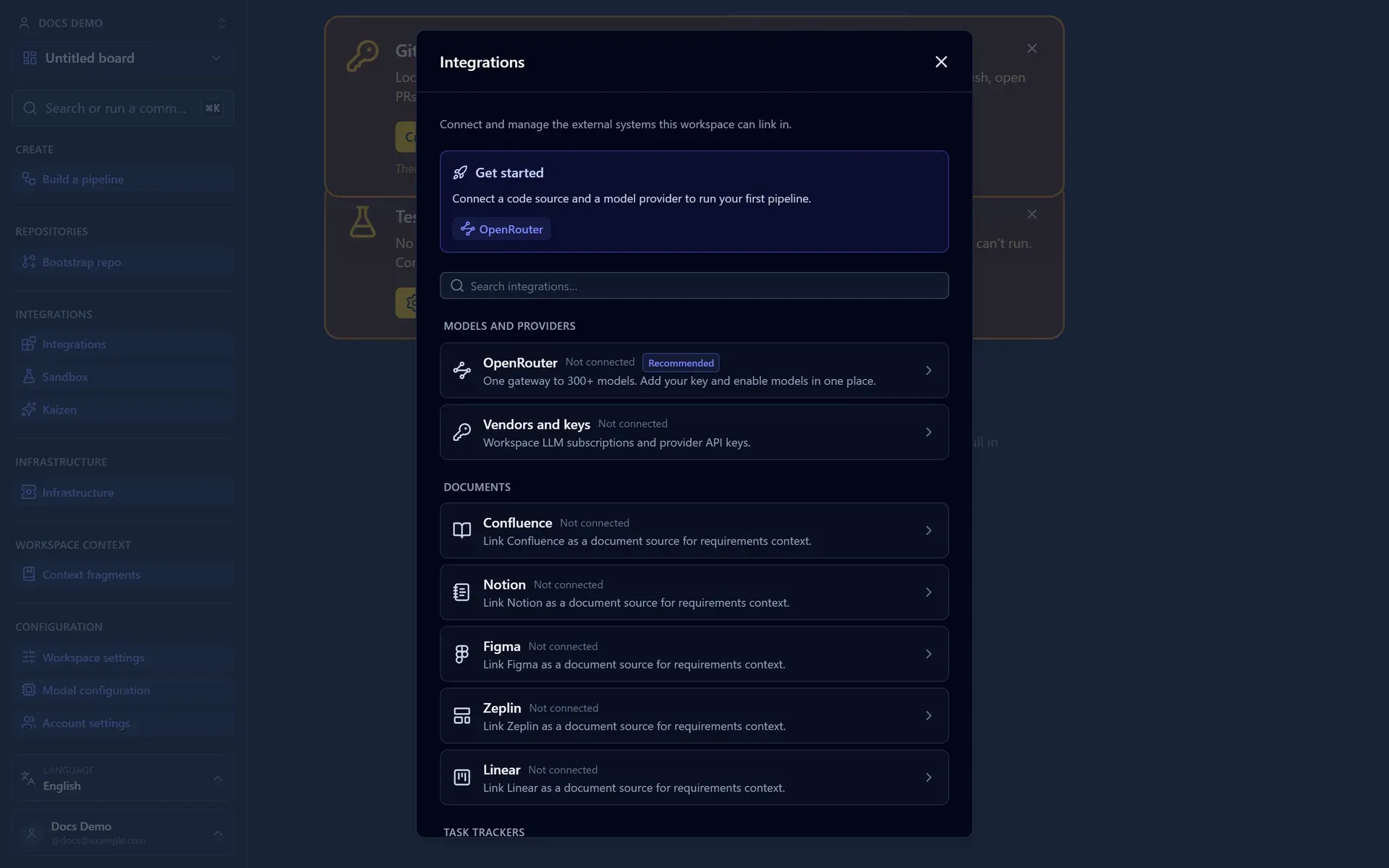
Document sources (Confluence, Notion, GitHub repo docs, the Figma and Zeplin design-context sources, and Linear Docs) and the Jira task source are always on: they ship enabled and each workspace connects its own site through the UI, with credentials stored encrypted under ENCRYPTION_KEY. There is no per-integration enable flag. The integrations fail loudly at boot if ENCRYPTION_KEY is missing rather than silently returning errors later.
Each workspace connects its own sites from the Integrations panel (sidebar → Integrations), which lists model providers alongside the document and task-tracker sources:
| Variable | Purpose |
|---|---|
DOCUMENT_SOURCES | Comma-separated allow-list of document sources to expose. Defaults to confluence,notion,github,figma,zeplin,linear (every known source). figma and zeplin are design-context sources, each connected per workspace with a personal access token. |
DOCUMENT_PLANNER | How imported documents are turned into context: llm (default) or headings (deterministic split). |
Task sources (Jira, GitHub Issues, and Linear) are configured per workspace. Each workspace turns its sources on or off in the UI (Workspace settings → Issue tracker); they work on every runtime, GitHub Issues rides the per-tenant GitHub App installation (or, in local mode, the PAT) with no env, and Linear connects per workspace via OAuth or a personal API key. See Connect Issue & Document Sources. The tech-debt recurring pipeline files its ticket through the workspace's chosen filing tracker.
Observability
Every model call is metered for the spend gauge and the in-app observability dashboard. Two optional settings tune what is recorded and where it is sent. Both are covered in depth in Observability.
| Variable | Purpose |
|---|---|
LLM_RECORD_PROMPTS | Set to false to drop prompt text from recorded metrics and to skip full agent-context capture (tokens, timing, finish reason, and counts are still kept). Defaults to recording prompts. |
LANGFUSE_ENABLED | Set to true to stream every LLM call to Langfuse as a trace. Off by default. |
LANGFUSE_PUBLIC_KEY / LANGFUSE_SECRET_KEY | Langfuse project keys (pk-lf-… / sk-lf-…). Both required when enabled. |
LANGFUSE_BASE_URL | Langfuse host. Optional; defaults to https://cloud.langfuse.com. Self-hosted needs v3.22.0+, which is where the OpenTelemetry endpoint traces are sent to arrived. |
Langfuse honours LLM_RECORD_PROMPTS: with prompts off, the traces carry only numeric telemetry.
Telemetry store
Call metrics and full agent-context snapshots live in an isolated telemetry store, separate from the main application database. On Cloudflare it is a dedicated D1 database; on Node and local it is a telemetry schema inside the existing DATABASE_URL database. A retention cron prunes it on a schedule. See Observability → The telemetry store.
| Variable | Purpose |
|---|---|
TELEMETRY_DB | Cloudflare only. D1 binding for the telemetry store. Required on the Worker: the build path and the retention cron fail fast if it is unbound. On Node and local the store is a telemetry schema in DATABASE_URL, with no separate binding. |
PROVISIONING_DB | Cloudflare only. Optional D1 binding for the ephemeral-environment and container-provisioning event log. The log is off when unbound. On Node and local it is a provisioning schema in DATABASE_URL. |
LLM_CALL_METRICS_RETENTION_DAYS | How long call metrics and agent-context snapshots are kept before the retention cron prunes them. Defaults to 14 days. |
PROVISIONING_LOG_RETENTION_DAYS | How long provisioning events are kept. Defaults to 14 days. |
The post-release-health gate and Agent-On-Call watch production through a pluggable observability provider (Datadog today) after a merge. They are opt-in and covered in Observability → Post-release health.
| Variable | Purpose |
|---|---|
OBSERVABILITY_ENABLED | Set to true to enable the post-release-health gate and Agent-On-Call (also requires ENCRYPTION_KEY). Off by default; the gate is a pass-through when unset. The per-workspace provider site and keys are entered in the UI and sealed at rest. |
PAGERDUTY_API_TOKEN + PAGERDUTY_FROM_EMAIL | Optional. Post the on-call investigation as an annotation onto an open PagerDuty incident. |
INCIDENTIO_API_KEY | Optional. The same enrichment for incident.io. |
Notifications (Slack and webhooks)
Board notifications (merge reviews, pipeline completions, CI failures, requirement reviews) land in the in-app inbox by default. Slack and a per-workspace outbound webhook are optional extra transports. Both are opt-in and configured per workspace, and their secrets are encrypted under ENCRYPTION_KEY. Full setup is in Set Up Notifications.
| Variable | Purpose |
|---|---|
SLACK_ENABLED | Set to true to make Slack available. Requires ENCRYPTION_KEY. |
SLACK_CLIENT_ID / SLACK_CLIENT_SECRET | Optional. Enable the OAuth "Add to Slack" flow; without them, operators paste a bot token by hand. |
SLACK_REDIRECT_URL | Optional OAuth callback, e.g. https://your-host/slack/oauth/callback. |
NOTIFICATION_WEBHOOK_ALLOW_URL_HOSTS | Optional. Comma-separated hostnames a webhook endpoint may use despite the private/internal-host block. Same matching rules as the environment and runner-pool allow-lists, and scoped independently of them. |
NOTIFICATION_WEBHOOK_ALLOW_HTTP_URLS | Optional. Set to true to also permit plain http webhook endpoints (a local-development affordance). |
Email (invitations)
Email carries invitation links. There is no separate enable flag: email is available whenever an encryption key is set (the per-account API key is sealed with it). The provider, API key, and From address are then onboarded per account in the UI and stored sealed in the database (like the Slack bot token). Adapters exist for SendGrid and Resend. With no sender connected, invitations still work: the accept link is returned for manual sharing.
| Variable | Purpose |
|---|---|
APP_BASE_URL | The SPA origin that invitation accept links point at. Falls back to AUTH_SUCCESS_REDIRECT_URL. |
EMAIL_ENCRYPTION_KEY | Optional. Seals the per-account email API key at rest; falls back to the shared ENCRYPTION_KEY. |
Feature toggles
Optional integrations enabled by their own flag:
| Variable | Purpose |
|---|---|
PROMPT_LIBRARY_ENABLED | The prompt-fragment library is on by default (it needs no secrets and its tables ship in the base migrations). Set to false to turn it off. PROMPT_LIBRARY_SELECTOR=llm ranks fragments per run; anything else keeps the deterministic default. |
CONSENSUS_ENABLED | Set to true to enable multi-model consensus on eligible steps. Off (unset) leaves the standard single-actor behaviour; the task-estimator step works either way. |
OBSERVABILITY_ENABLED | Set to true for the post-release-health gate and Agent-On-Call (also requires ENCRYPTION_KEY). |
SANDBOX_DB | Cloudflare only. Optional D1 binding that turns on the Compare Prompts and Models in the Sandbox for prompt and model testing. The Sandbox is off until it is bound. On Node and local it is a sandbox schema in DATABASE_URL. |
Ephemeral environments have no enable flag. The module assembles wherever ENCRYPTION_KEY is set (it seals environment-provider credentials under that key), the same always-on-where-the-key-is-present model as the document and task sources. It stays inert until a workspace registers an infrastructure handler and a pipeline includes a deployer/tester step, so there is nothing to turn on at the deployment level.
Treat secrets as secrets
Provider keys, subscription tokens, the GitHub App private key, ENCRYPTION_KEY, the Langfuse secret key, HARNESS_SHARED_SECRET, and the webhook secret are all sensitive. On Cloudflare, set them as secret bindings (wrangler secret put …); on Node.js and local, keep them in your .env / secret manager and never commit them.
Next: scale execution with Run Jobs on Your Own Runners and Provision Ephemeral Environments, or check a value you set against Troubleshooting.